

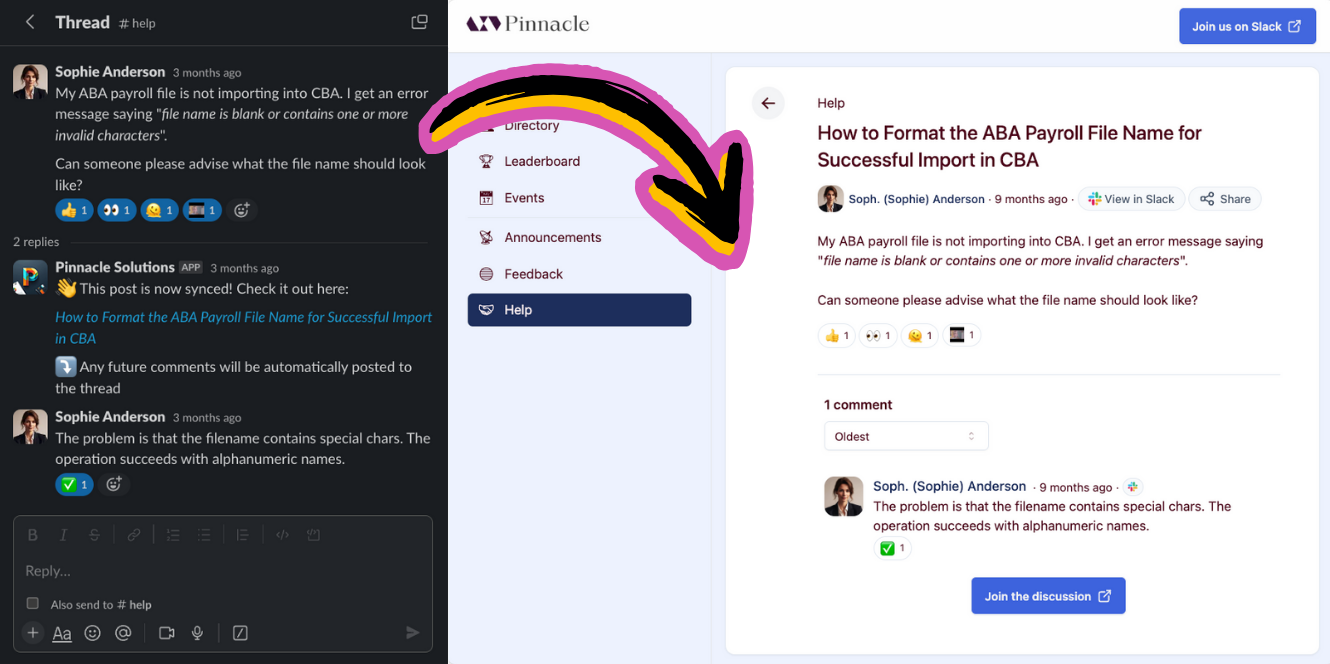
Emoji reactions synced between Slack and the community site
Mark answers with reactions
In a feed with Selected answers turned on, the thread’s author or a community admin can mark a reply as an answer by reacting to it in Slack. Reactions from other members don’t change answers. A thread can have up to 5 answers.
Each time your reaction changes an answer, the Tightknit app posts a confirmation in the thread that only you can see. The reply’s author gets a DM from the Tightknit app. Marking your own reply, or a reply that’s already marked, sends no DM. Members can turn this DM off under Notifications in the Community Home.
Set up selected answers
1
Turn on Selected answers for a feed
Go to Feeds in Studio, open the feed, and turn on Selected answers in its side panel.
2
Choose the reaction emoji (optional)
Go to Integrations > Slack in Studio and choose the Selected answer emoji and Best answer emoji under Selected Answers. You can use your workspace’s custom emoji. Changes reach Slack within a minute.
Unmark an answer
Removing a reaction unmarks the reply only once neither the thread’s author nor an admin still has that reaction on it:- Removing the answer reaction unmarks the answer.
- Removing the best answer reaction keeps the reply as an answer, but no longer the best one.
Answers marked outside Slack
When someone marks an answer on the community site, in Studio, or through MCP, the Tightknit app adds the matching reaction to the reply in Slack, and removes it when the answer changes:- The reaction follows the answer, not the site. It stays on a reply that’s unpublished, or in a feed with Selected answers turned off, for as long as the reply is marked.
- The Tightknit app doesn’t add an emoji someone already put on the reply. If that person later removes theirs while the reply is still an answer, the app adds its own.
- The app’s reactions don’t mark answers and don’t appear on the community site.