

Deleting from Slack
When you delete your Slack message using the Delete action, your post or comment will automatically be removed from the Tightknit community site.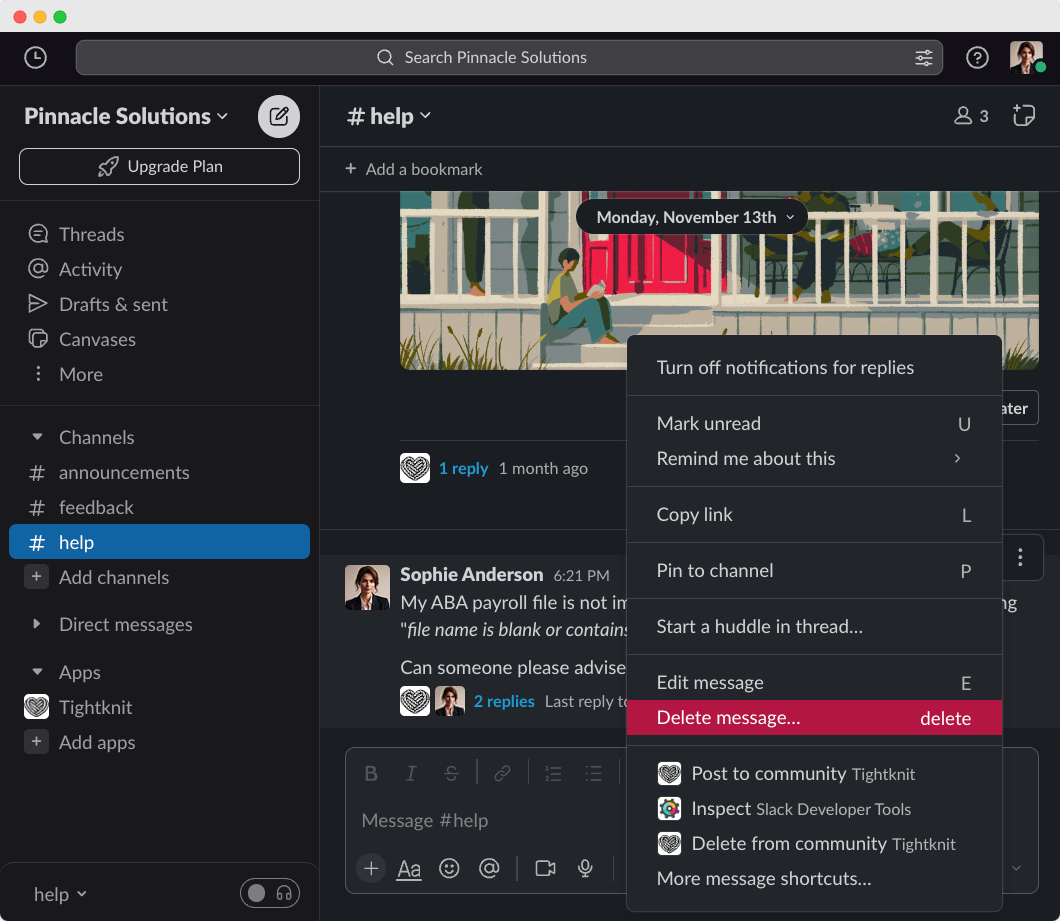
Deleting a message in Slack
Posts
Deleting a top-level Slack message will remove the corresponding post and its comments from the Tightknit community site.Comments
Deleting a message reply in Slack will remove only that comment from the Tightknit community site. The post and the remainder of the comments will be preserved.Deleting the New Post Notification Agent reply is another way to trigger
the removal of the post, and any of its comments, from the Tightknit community
site. This reply is only applicable in channels where the agent has been
enabled in Agent Settings.
Deleting from the community site
If interactivity is enabled, authors can delete their own site-created posts and comments directly from the community site. From the post detail page, open the actions menu and select Delete. A confirmation dialog will appear before the deletion is finalized.- Posts: Deleting a post removes the post from the community site. The corresponding Slack message is also deleted.
- Comments: Deleting a comment removes only that comment. The corresponding Slack thread reply is also deleted.
Only posts and comments that were originally created on the community site can
be deleted from the site. Content originating from Slack must be deleted in
Slack. If you attempt to delete Slack-sourced content from the site, you will see a prompt directing you to delete it in Slack instead.