> ## Documentation Index
> Fetch the complete documentation index at: https://docs.tightknit.ai/llms.txt
> Use this file to discover all available pages before exploring further.
# Thread Engagement Reminder
> Enable automatic nudges to encourage thread-first behavior and keep channels tidy.
## Overview
The Thread Engagement Reminder agent helps your keep conversations tidy by replying to a message with a friendly, action-oriented reminder to use threads.
It encourages thread-first habits while minimizing channel noise in your community.
## Setup
In Slack, open the Tightknit app Home tab.
Navigate to the Channels & Feeds section.
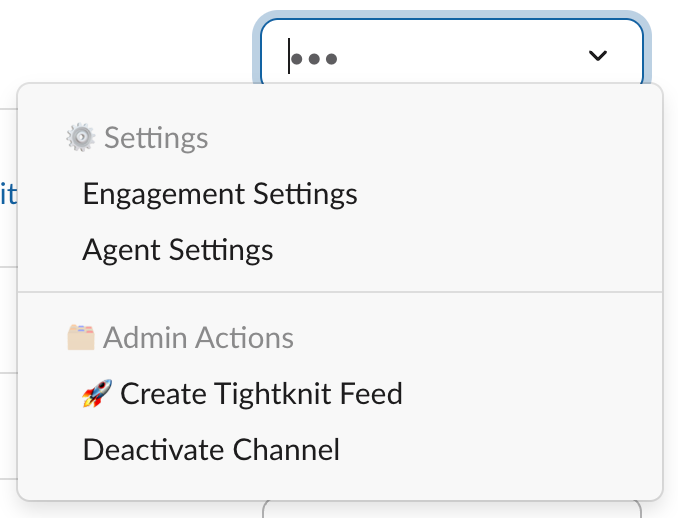
 For the desired channel, open the overflow menu (•••) and select Engagement Settings.
 Toggle Engagement Reminder on, then click Save.
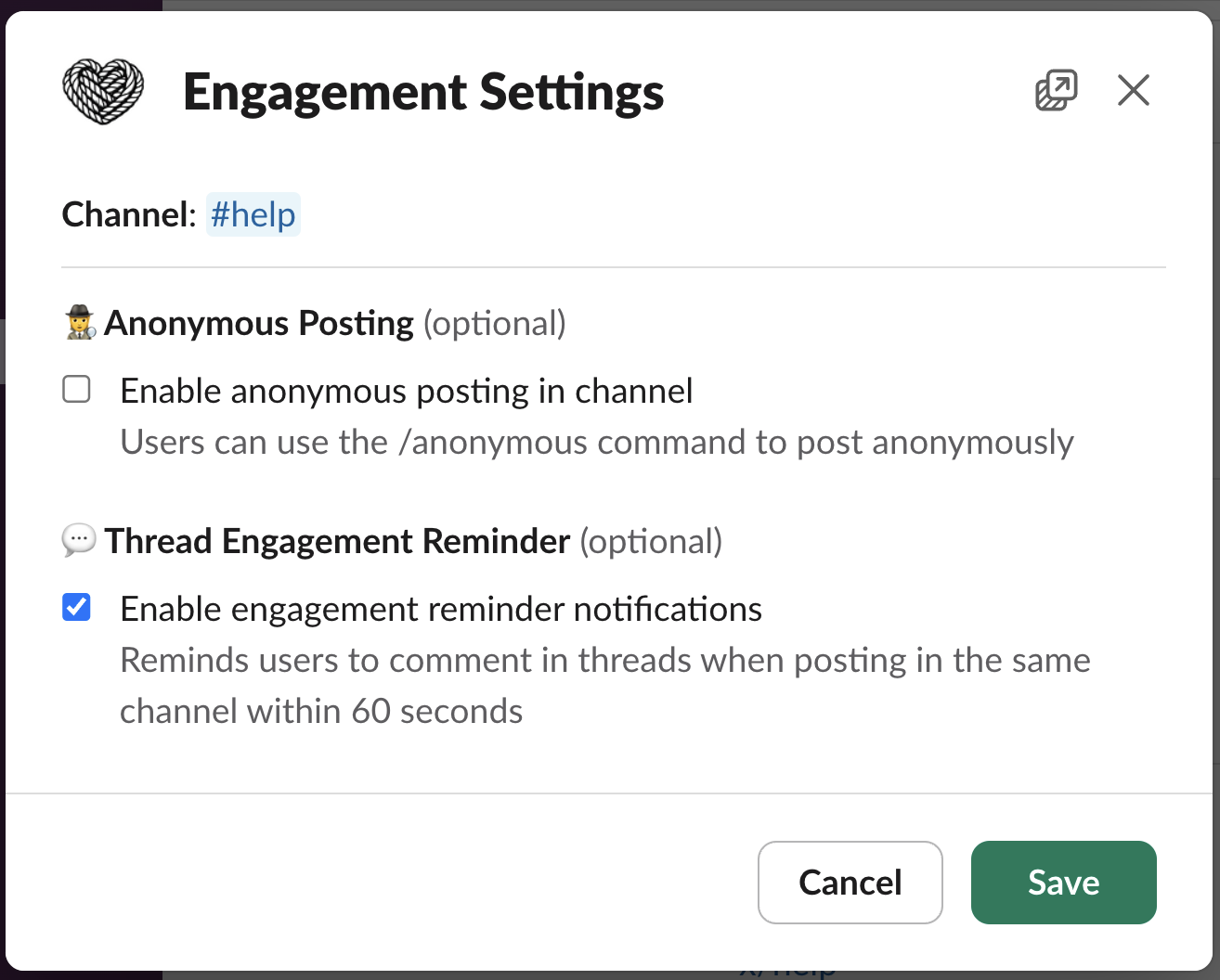 You can review all engagement features on the Engagement Settings page.
See also: Engagement Settings.
## How it works (and what people will see)
When enabled, the Thread Engagement Reminder posts a short, friendly reply in a thread to nudge thread-first conversation, but only in a specific scenario.
It will show up when:
* The same person posts again in the same channel within 60 seconds of their previous message, and the follow-up is not a threaded reply
What it does:
* Posts a concise, helpful message as a reply under the original message's thread
* Encourages continuing the conversation in that thread to keep the channel tidy
* Never blocks messages; it only nudges
It will not show up when:
* The follow-up is posted as a thread reply
* More than 60 seconds have passed since the person's previous message in that channel
Example response (actual text may vary):
You can review all engagement features on the Engagement Settings page.
See also: Engagement Settings.
## How it works (and what people will see)
When enabled, the Thread Engagement Reminder posts a short, friendly reply in a thread to nudge thread-first conversation, but only in a specific scenario.
It will show up when:
* The same person posts again in the same channel within 60 seconds of their previous message, and the follow-up is not a threaded reply
What it does:
* Posts a concise, helpful message as a reply under the original message's thread
* Encourages continuing the conversation in that thread to keep the channel tidy
* Never blocks messages; it only nudges
It will not show up when:
* The follow-up is posted as a thread reply
* More than 60 seconds have passed since the person's previous message in that channel
Example response (actual text may vary):
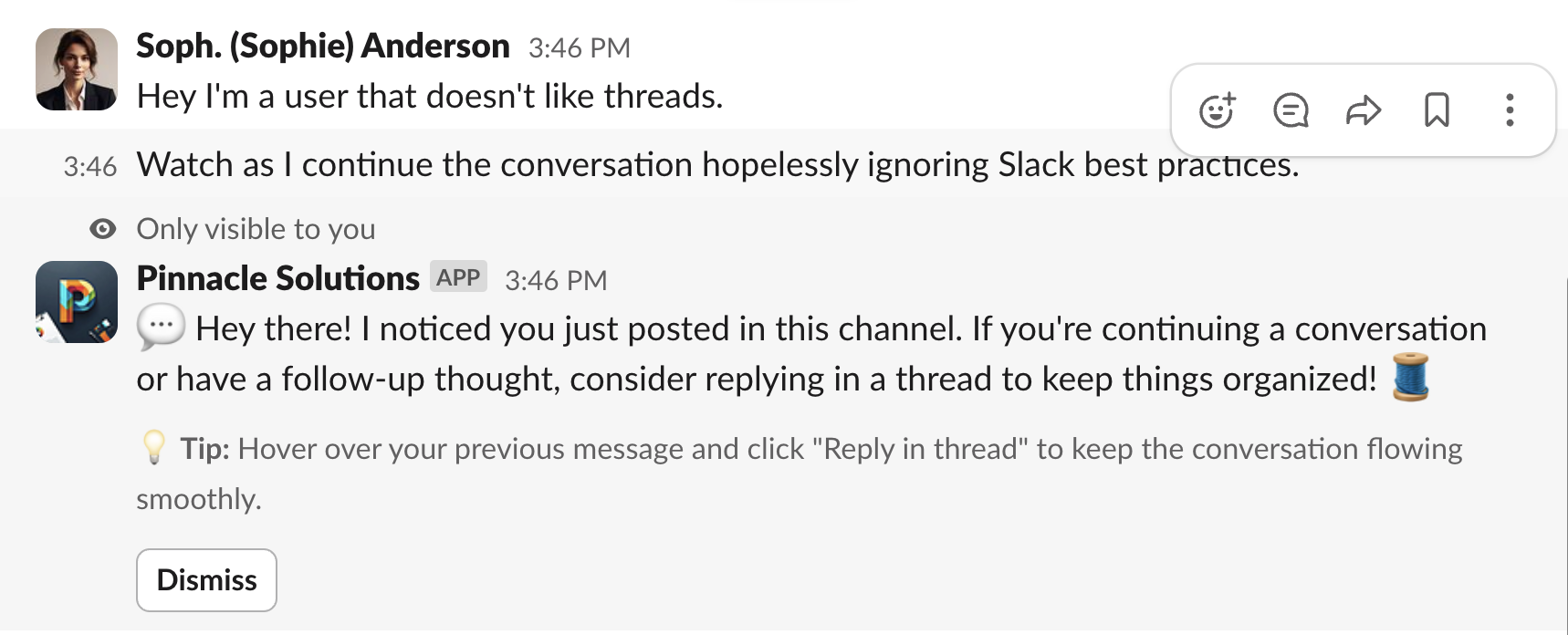 > 🧵 To keep this conversation tidy, we've replied here in a thread. Follow along or reply here to keep context together. If you need broader attention, you can still share a summary in the main channel.
## Related topics
- [Activate a Channel for Tightknit](/channels-and-feeds/activate-channel.md)
- [Engagement Settings](/channels-and-feeds/engagement-settings.md)
- [Agent Settings](/channels-and-feeds/agent-settings.md)
- [Zoom Meeting Templates](/guides/zoom-meeting-template-guide.md)
- [Anonymous Posting](/member-engagement/anonymous-posting.md)
> 🧵 To keep this conversation tidy, we've replied here in a thread. Follow along or reply here to keep context together. If you need broader attention, you can still share a summary in the main channel.
## Related topics
- [Activate a Channel for Tightknit](/channels-and-feeds/activate-channel.md)
- [Engagement Settings](/channels-and-feeds/engagement-settings.md)
- [Agent Settings](/channels-and-feeds/agent-settings.md)
- [Zoom Meeting Templates](/guides/zoom-meeting-template-guide.md)
- [Anonymous Posting](/member-engagement/anonymous-posting.md)