> ## Documentation Index
> Fetch the complete documentation index at: https://docs.tightknit.ai/llms.txt
> Use this file to discover all available pages before exploring further.
# Audit
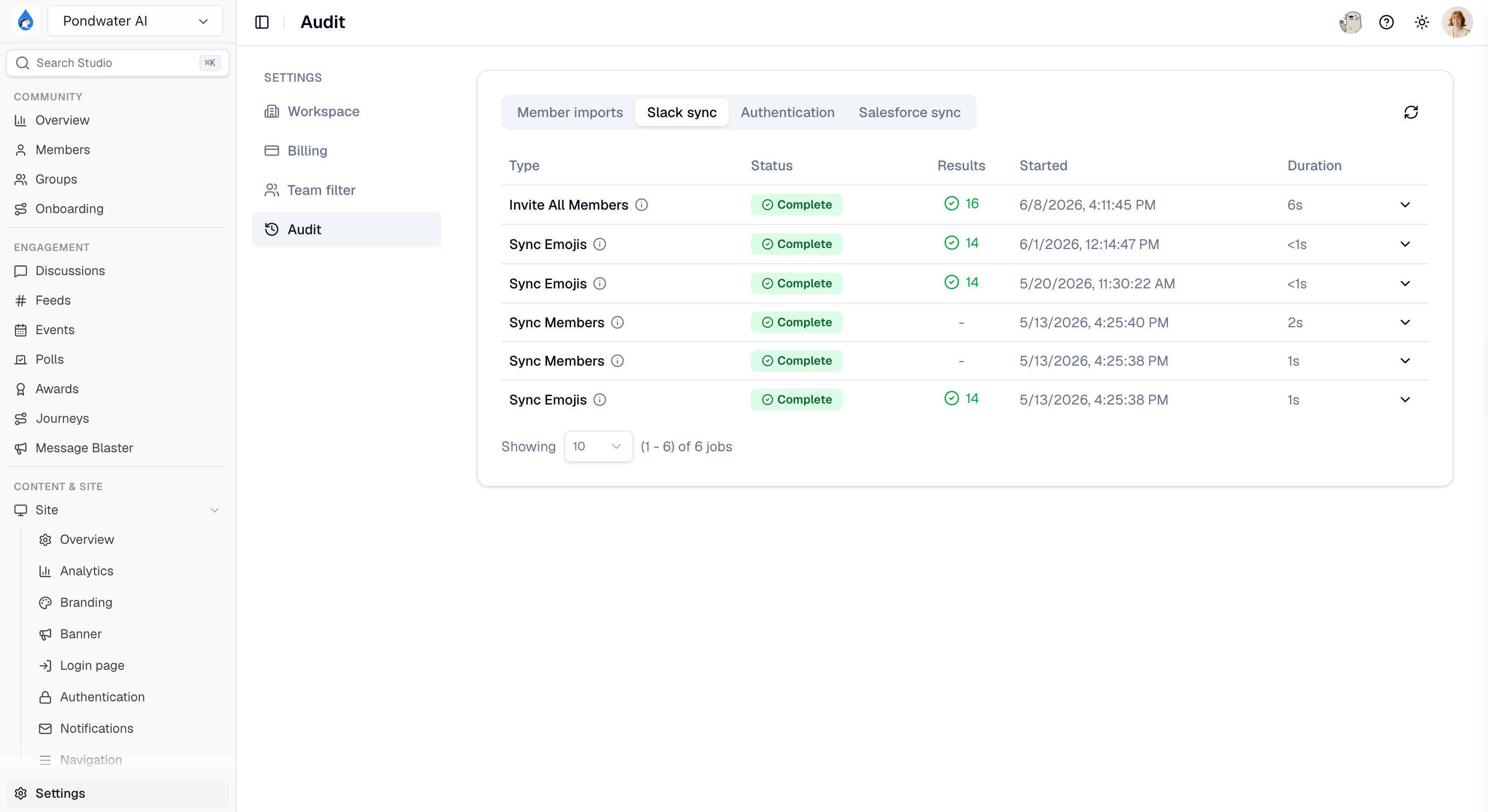
> Review member import history, Slack and Salesforce sync jobs, and community-wide authentication events.
The **Audit** page collects the history that lets you answer "did that actually work?" and "who signed in, and when?" It sits under **[Settings > Audit](https://studio.tightknit.ai/-/workspace/audit)** in Studio.
The page is organised into tabs. You only see the tabs your role grants, so a teammate may see fewer tabs than you do.
 ## Member imports
Every bulk member import you have run, with its status and results. Use it to confirm a CSV import finished, and to see which rows were skipped and why.
This tab requires member management access and the CSV import capability. If your plan does not include bulk imports, the tab does not appear. See [Creating members](/studio/members#creating-members).
## Slack sync
The history of sync jobs between your Slack workspace and Tightknit, including backfills. When a channel's older messages are missing from [Discussions](/studio/discussions), this is where you confirm whether the backfill ran and whether it completed.
For what Tightknit syncs and how reliably, see the [sync guide](/slack/sync-guide) and [data sync reliability](/slack/data-sync-reliability).
## Salesforce sync
Sync jobs for the [Salesforce integration](/integrations/salesforce), with per-job detail. Click into a job to see its records processed and any errors.
## Authentication
The community-wide record of every sign-in attempt against your [community site](/community-site/authentication).
| Column | Description |
| ------------- | ----------------------------------------------------------------------- |
| **Timestamp** | When the attempt happened. |
| **ID** | The event's unique identifier, useful when contacting support. |
| **Event** | The kind of authentication event, such as a sign-in or an account link. |
| **Source** | Which authentication method was used. |
| **Outcome** | Whether the attempt succeeded or failed. |
| **Email** | The address the attempt was made with. |
| **Data** | Additional event detail. |
The Authentication tab is **admin only**. No other role grants it, because it exposes the email address used in every sign-in attempt, including attempts by people who are not members of your community. Granting a teammate a management role does not give them this tab.
To investigate one member rather than the whole community, open their profile in [Members](/studio/members#authentication-tab). The Authentication tab there shows that member's connected accounts and their own auth event history.
## Related pages
* **[Activity feed](/activity-logs/getting-started)** - community interactions rather than jobs and sign-ins.
* **[Authentication](/community-site/authentication)** - configuring how members sign in.
* **[Troubleshooting](/support/troubleshooting)** - common sign-in and sync failures.
## Related topics
- [Studio Settings](/studio/settings.md)
- [Tightknit Infrastructure & Application Security](/security/application.md)
- [Authentication](/community-site/authentication.md)
- [Security at Tightknit](/security/overview.md)
- [SOC 2 Compliance](/security/soc-2.md)
## Member imports
Every bulk member import you have run, with its status and results. Use it to confirm a CSV import finished, and to see which rows were skipped and why.
This tab requires member management access and the CSV import capability. If your plan does not include bulk imports, the tab does not appear. See [Creating members](/studio/members#creating-members).
## Slack sync
The history of sync jobs between your Slack workspace and Tightknit, including backfills. When a channel's older messages are missing from [Discussions](/studio/discussions), this is where you confirm whether the backfill ran and whether it completed.
For what Tightknit syncs and how reliably, see the [sync guide](/slack/sync-guide) and [data sync reliability](/slack/data-sync-reliability).
## Salesforce sync
Sync jobs for the [Salesforce integration](/integrations/salesforce), with per-job detail. Click into a job to see its records processed and any errors.
## Authentication
The community-wide record of every sign-in attempt against your [community site](/community-site/authentication).
| Column | Description |
| ------------- | ----------------------------------------------------------------------- |
| **Timestamp** | When the attempt happened. |
| **ID** | The event's unique identifier, useful when contacting support. |
| **Event** | The kind of authentication event, such as a sign-in or an account link. |
| **Source** | Which authentication method was used. |
| **Outcome** | Whether the attempt succeeded or failed. |
| **Email** | The address the attempt was made with. |
| **Data** | Additional event detail. |
The Authentication tab is **admin only**. No other role grants it, because it exposes the email address used in every sign-in attempt, including attempts by people who are not members of your community. Granting a teammate a management role does not give them this tab.
To investigate one member rather than the whole community, open their profile in [Members](/studio/members#authentication-tab). The Authentication tab there shows that member's connected accounts and their own auth event history.
## Related pages
* **[Activity feed](/activity-logs/getting-started)** - community interactions rather than jobs and sign-ins.
* **[Authentication](/community-site/authentication)** - configuring how members sign in.
* **[Troubleshooting](/support/troubleshooting)** - common sign-in and sync failures.
## Related topics
- [Studio Settings](/studio/settings.md)
- [Tightknit Infrastructure & Application Security](/security/application.md)
- [Authentication](/community-site/authentication.md)
- [Security at Tightknit](/security/overview.md)
- [SOC 2 Compliance](/security/soc-2.md)