> ## Documentation Index
> Fetch the complete documentation index at: https://docs.tightknit.ai/llms.txt
> Use this file to discover all available pages before exploring further.
# Working With File Attachments
> Learn how to upload, manage, and delete file attachments.
## Upload a File
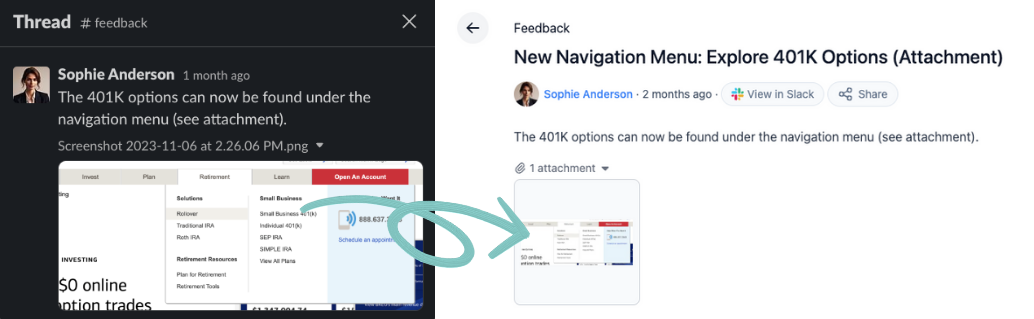
Files up to 5MB in size that are attached to Slack messages will be synced to the Tightknit community site.
They will appear as attachments on the corresponding post or comment.
 Please contact [Support](mailto:support@tightknit.ai) if you need to upload
files larger than 5MB.
Tightknit communities are limited to 50GB of total file storage per workspace.
### Blog Cover Images
For Feeds that are configured to [display posts as "Blogs,"](/community-site/pages#blog) the cover image used is the first image file attachment on the Slack message, if any.
## Delete a File
If a file is attached to a message and the message is deleted in Slack, or the post/comment is removed from the Tightknit site using the message shortcut, the file is also deleted.
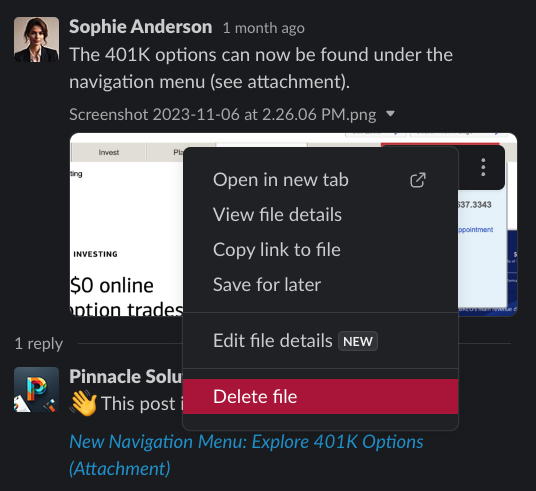
You may also use the `Delete file` action in Slack. This action will only delete the file in Slack and in the Tightknit community site, and the post/comment will be preserved.
Please contact [Support](mailto:support@tightknit.ai) if you need to upload
files larger than 5MB.
Tightknit communities are limited to 50GB of total file storage per workspace.
### Blog Cover Images
For Feeds that are configured to [display posts as "Blogs,"](/community-site/pages#blog) the cover image used is the first image file attachment on the Slack message, if any.
## Delete a File
If a file is attached to a message and the message is deleted in Slack, or the post/comment is removed from the Tightknit site using the message shortcut, the file is also deleted.
You may also use the `Delete file` action in Slack. This action will only delete the file in Slack and in the Tightknit community site, and the post/comment will be preserved.
 ## Limitations
The following files or attachments are currently unsupported and will not be ingested by Tightknit:
* Snippets
* Slack Connect files
* Unfurled attachments, such as Google Drive files or Google Docs
* Files over 5MB
* Forwarded or shared Slack messages
* Files or images sent as `blocks` using Block Kit UI
## Related topics
- [Pages](/community-site/pages.md)
- [Download an award image](/api-reference/public/download-an-award-image.md)
- [Create a Post or Comment](/slack/posts-and-comments/create-post-or-comment.md)
- [Upload file](/api-reference/files/upload-file.md)
- [Message Shortcuts](/slack/shortcuts-and-commands/message-shortcuts.md)
## Limitations
The following files or attachments are currently unsupported and will not be ingested by Tightknit:
* Snippets
* Slack Connect files
* Unfurled attachments, such as Google Drive files or Google Docs
* Files over 5MB
* Forwarded or shared Slack messages
* Files or images sent as `blocks` using Block Kit UI
## Related topics
- [Pages](/community-site/pages.md)
- [Download an award image](/api-reference/public/download-an-award-image.md)
- [Create a Post or Comment](/slack/posts-and-comments/create-post-or-comment.md)
- [Upload file](/api-reference/files/upload-file.md)
- [Message Shortcuts](/slack/shortcuts-and-commands/message-shortcuts.md)