> ## Documentation Index
> Fetch the complete documentation index at: https://docs.tightknit.ai/llms.txt
> Use this file to discover all available pages before exploring further.
# Emoji Reactions
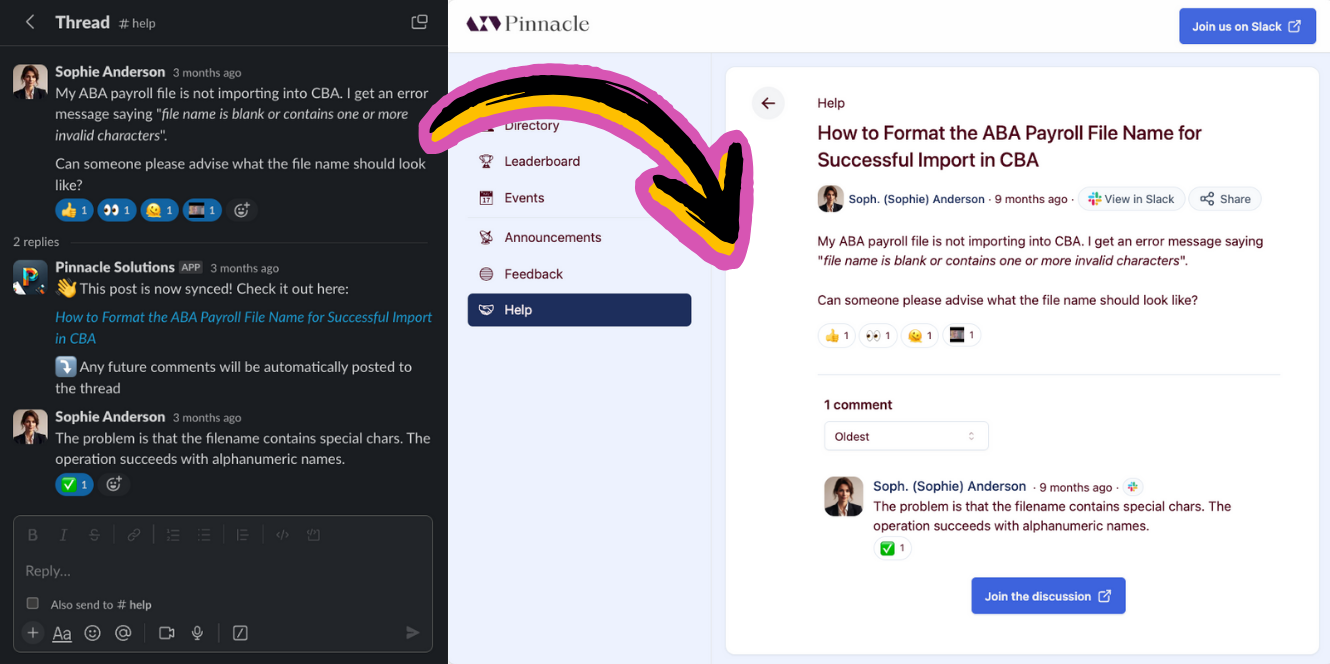
> Learn how emoji reactions are synced between Slack and your community site
When an emoji reaction is added or removed to a Slack message synced by Tightknit, it will automatically sync emoji reactions, including custom emojis, to the corresponding post or comment in the Tightknit community site.
 ## Related topics
- [Activity Logs](/activity-logs/getting-started.md)
- [Create a Post or Comment](/slack/posts-and-comments/create-post-or-comment.md)
- [Slack Sync Guide](/slack/sync-guide.md)
- [Pages](/community-site/pages.md)
- [Slack Scopes & Permissions](/security/slack-scopes.md)
## Related topics
- [Activity Logs](/activity-logs/getting-started.md)
- [Create a Post or Comment](/slack/posts-and-comments/create-post-or-comment.md)
- [Slack Sync Guide](/slack/sync-guide.md)
- [Pages](/community-site/pages.md)
- [Slack Scopes & Permissions](/security/slack-scopes.md)