> ## Documentation Index
> Fetch the complete documentation index at: https://docs.tightknit.ai/llms.txt
> Use this file to discover all available pages before exploring further.
# Edit a Post or Comment
> Learn how to edit existing posts and comments in your community site
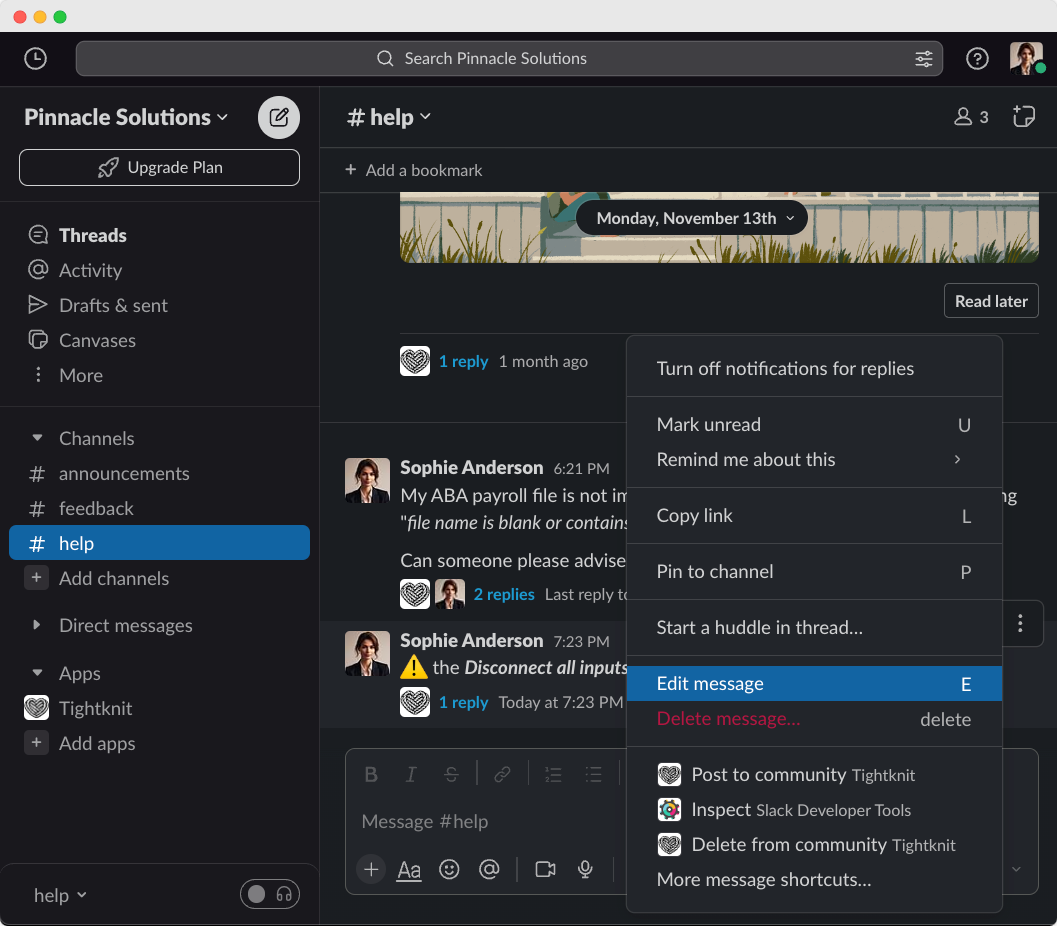
Edit your messages in Slack, and we'll update them in the Tightknit community site automatically.
## Slack Action
When you edit your Slack message body using the [Edit action](https://slack.com/help/articles/202395258-Edit-or-delete-messages#edit-a-message), your post or comment will
automatically be updated to reflect those changes in the Tightknit community site.
 ## Message Shortcut: Edit Post Title and Slug
You can also update the post title and slug using the Tightknit [message shortcut](/slack/shortcuts-and-commands/message-shortcuts#tightknit-shortcuts).
## Editing from the community site
If [interactivity](/community-site/overview#interactivity) is enabled, authors can also edit their own posts and comments directly on the community site. From the post detail page, use the actions menu to select **Edit**.
* **Posts**: You can modify the title and body. Edits sync back to the original Slack message.
* **Comments**: You can modify the comment body inline. Edits sync back to the Slack thread reply.
Only posts and comments that were originally created on the community site can
be edited on the site. Content originating from Slack must be edited in Slack.
## Related topics
- [Create a Post or Comment](/slack/posts-and-comments/create-post-or-comment.md)
- [MCP Server](/integrations/mcp.md)
- [Delete a Post or Comment](/slack/posts-and-comments/delete-post-or-comment.md)
- [Overview](/community-site/overview.md)
- [Message Shortcuts](/slack/shortcuts-and-commands/message-shortcuts.md)
## Message Shortcut: Edit Post Title and Slug
You can also update the post title and slug using the Tightknit [message shortcut](/slack/shortcuts-and-commands/message-shortcuts#tightknit-shortcuts).
## Editing from the community site
If [interactivity](/community-site/overview#interactivity) is enabled, authors can also edit their own posts and comments directly on the community site. From the post detail page, use the actions menu to select **Edit**.
* **Posts**: You can modify the title and body. Edits sync back to the original Slack message.
* **Comments**: You can modify the comment body inline. Edits sync back to the Slack thread reply.
Only posts and comments that were originally created on the community site can
be edited on the site. Content originating from Slack must be edited in Slack.
## Related topics
- [Create a Post or Comment](/slack/posts-and-comments/create-post-or-comment.md)
- [MCP Server](/integrations/mcp.md)
- [Delete a Post or Comment](/slack/posts-and-comments/delete-post-or-comment.md)
- [Overview](/community-site/overview.md)
- [Message Shortcuts](/slack/shortcuts-and-commands/message-shortcuts.md)