> ## Documentation Index
> Fetch the complete documentation index at: https://docs.tightknit.ai/llms.txt
> Use this file to discover all available pages before exploring further.
# Create a Post or Comment
> Learn how to create new posts and comments in your community site
Creating new content in your Tightknit community site is as simple as sending messages in Slack!
## Posts
Once a Slack channel has been connected to a Tightknit Feed, all new messages sent within that channel
are synced to the Tightknit community site as **[posts](/community-site/pages#post)**.
You can enable the **New Post Notification Agent** in a Slack channel [Agent
Settings](/channels-and-feeds/agent-settings) in order to automatically get
reminders when each message is synced to the site (*featured below*).
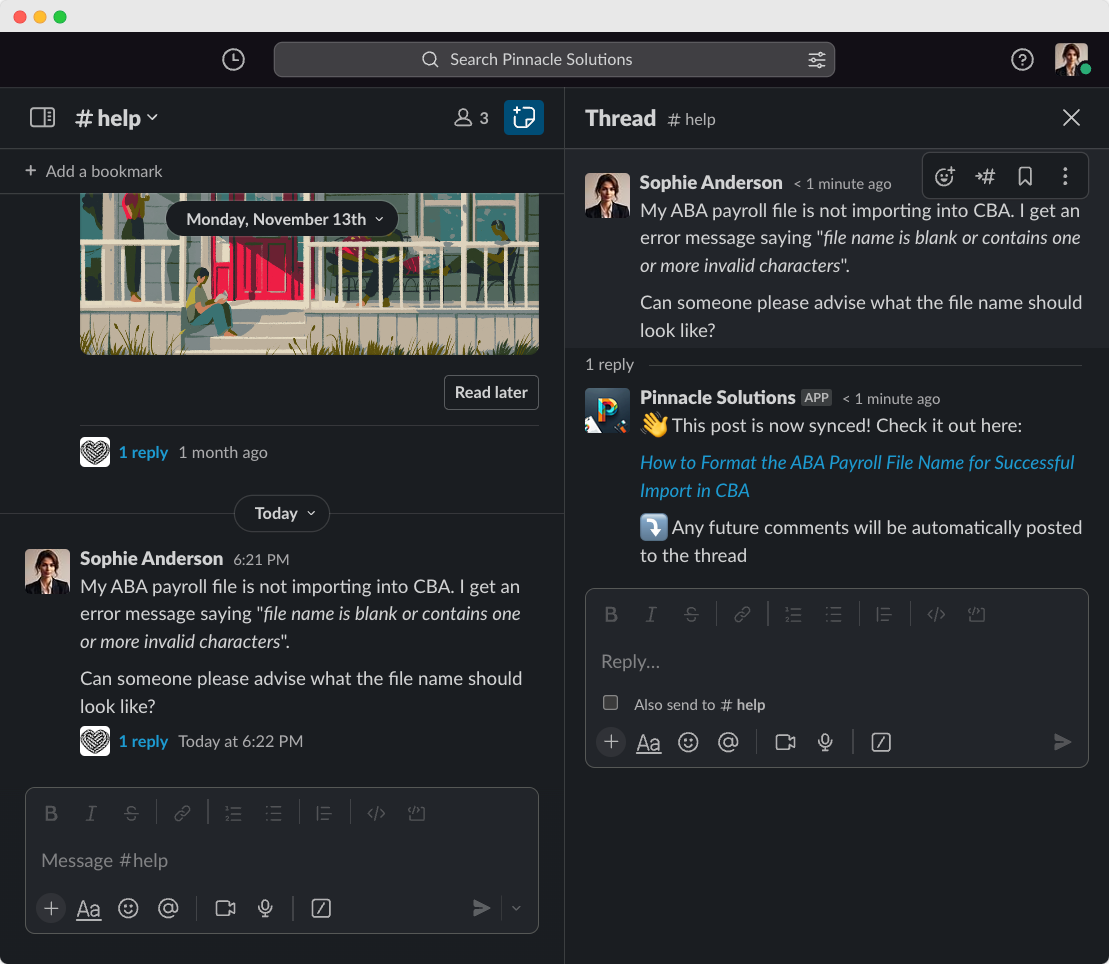
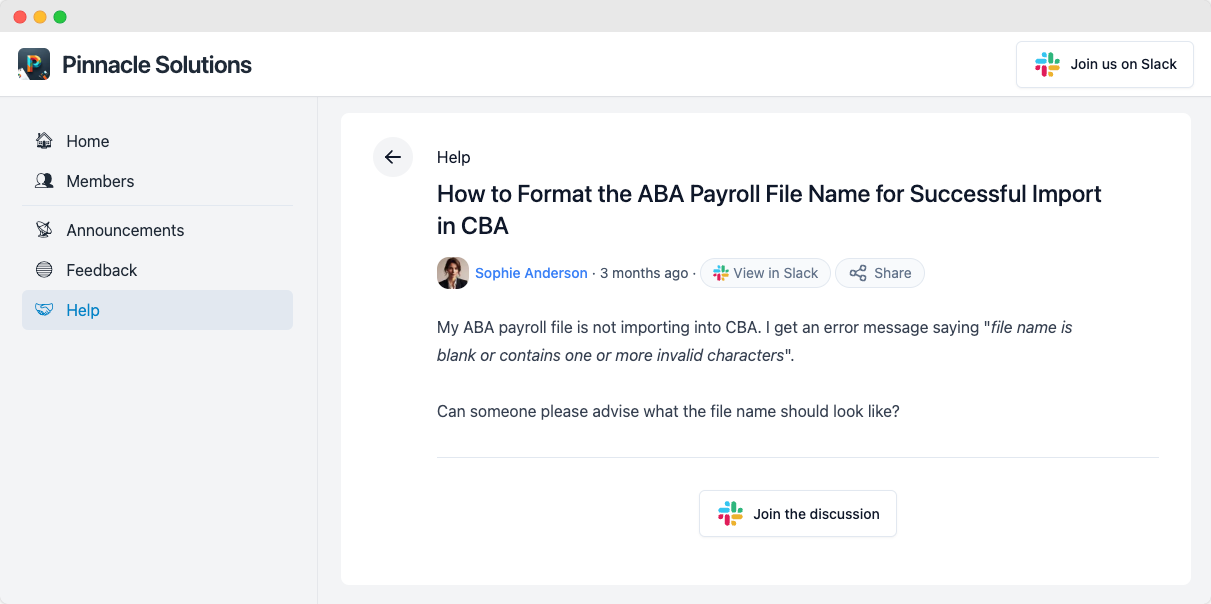 The Tightknit community site post will respect the posted date of the original Slack message. All posts contain a permalink back to the original Slack message.
### Title and Slug
The post title and URL slug are automatically generated using AI.
If you prefer a different title or slug, you can edit it using the [message shortcut](/slack/shortcuts-and-commands/message-shortcuts#tightknit-shortcuts).
## Comments
Any replies on a synced Slack message are synced to the Tightknit community site as **comments** on the post.
The Tightknit community site post will respect the posted date of the original Slack message. All posts contain a permalink back to the original Slack message.
### Title and Slug
The post title and URL slug are automatically generated using AI.
If you prefer a different title or slug, you can edit it using the [message shortcut](/slack/shortcuts-and-commands/message-shortcuts#tightknit-shortcuts).
## Comments
Any replies on a synced Slack message are synced to the Tightknit community site as **comments** on the post.
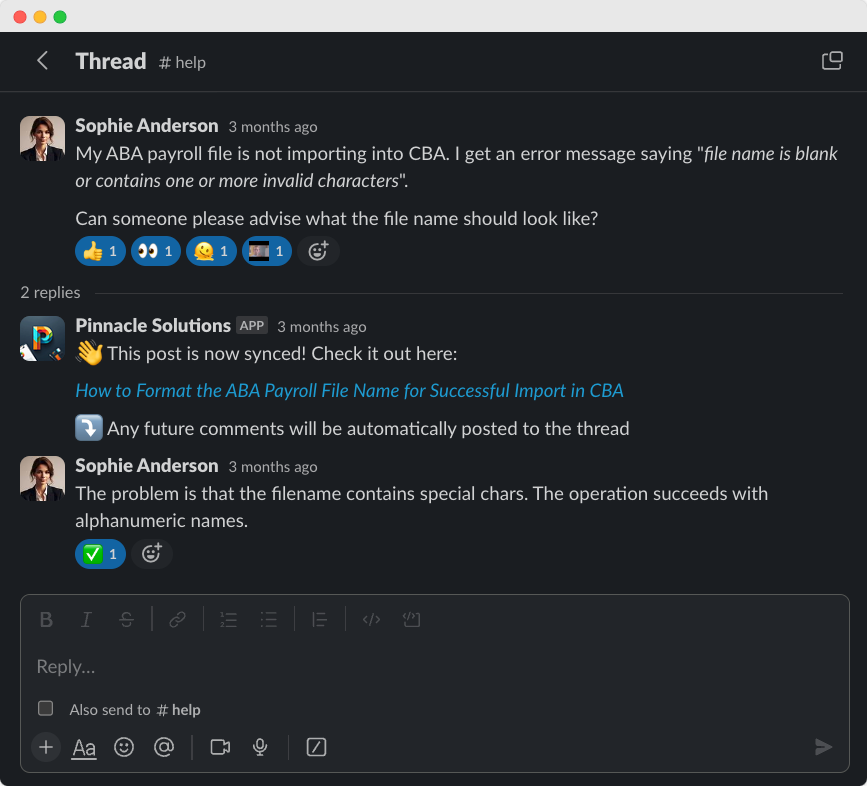
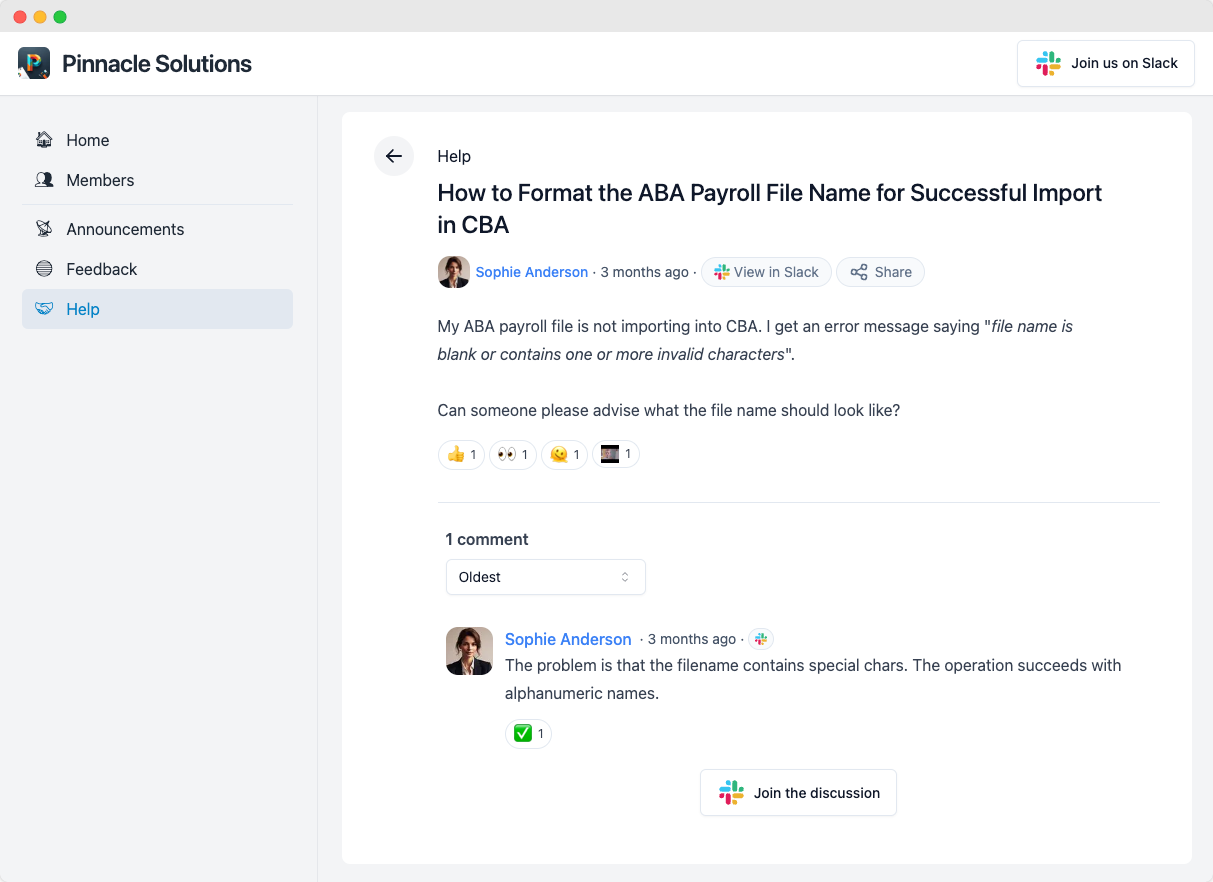 The Tightknit community site comment will respect the posted date of the original Slack message. All comments contain a permalink back to the original Slack message.
Tightknit treats all top-level Slack messages as posts in the Tightknit
community site and all replies as comments. When responding to someone in a
Slack channel, it is recommended to always reply in the message thread.
Otherwise, consecutive top-level messages will each create distinct posts in
the Tightknit community site without context of each other.
## Message Shortcut: Sync a Message to the Tightknit Community Site
Let's say you have a Slack message that is not synced to the Tightknit community site. Perhaps it is a message sent prior
to your Tightknit installation date, or maybe it was previously synced but a user removed it from the Tightknit community site using the message shortcut.
You can simply re-sync it to the Tightknit community site using the Tightknit [message shortcut](/slack/shortcuts-and-commands/message-shortcuts#tightknit-shortcuts).
Using the message shortcut will sync the entire message thread at once,
including the post, commments, file attachments, emoji reactions, etc.
## @Mentions and Tags
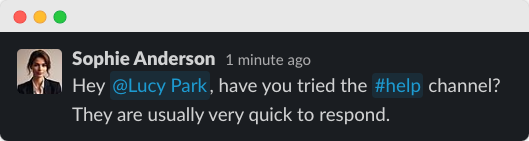
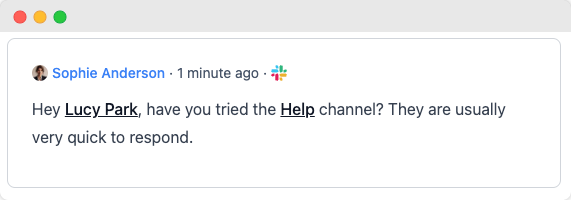
Tightknit will convert most @mention and tags within the body of a message to the equivalent name and link within the Tightknit community site.
| **Slack @mention** | **Tightknit display text** | **Tightknit link** |
| :------------------------------------- | :--------------------------------------------------------------------------------------------------------------------------------------------------------------------------- | :----------------- |
| @User | By default, uses the Slack profile full name. Please contact [Support](mailto:support@tightknit.ai) if you need a different name display style. | User profile page |
| #Channel | • If channel has connected Feed: Feed name
The Tightknit community site comment will respect the posted date of the original Slack message. All comments contain a permalink back to the original Slack message.
Tightknit treats all top-level Slack messages as posts in the Tightknit
community site and all replies as comments. When responding to someone in a
Slack channel, it is recommended to always reply in the message thread.
Otherwise, consecutive top-level messages will each create distinct posts in
the Tightknit community site without context of each other.
## Message Shortcut: Sync a Message to the Tightknit Community Site
Let's say you have a Slack message that is not synced to the Tightknit community site. Perhaps it is a message sent prior
to your Tightknit installation date, or maybe it was previously synced but a user removed it from the Tightknit community site using the message shortcut.
You can simply re-sync it to the Tightknit community site using the Tightknit [message shortcut](/slack/shortcuts-and-commands/message-shortcuts#tightknit-shortcuts).
Using the message shortcut will sync the entire message thread at once,
including the post, commments, file attachments, emoji reactions, etc.
## @Mentions and Tags
Tightknit will convert most @mention and tags within the body of a message to the equivalent name and link within the Tightknit community site.
| **Slack @mention** | **Tightknit display text** | **Tightknit link** |
| :------------------------------------- | :--------------------------------------------------------------------------------------------------------------------------------------------------------------------------- | :----------------- |
| @User | By default, uses the Slack profile full name. Please contact [Support](mailto:support@tightknit.ai) if you need a different name display style. | User profile page |
| #Channel | • If channel has connected Feed: Feed name
• If no connected Feed: channel name (text only, no link)
• If private channel: `🔒[private feed]` (text only, no link) | Feed page |
| @User group | Name of group (text only, no link) | |
| @here,
@channel,
@everyone | Text only, no link | |
User and Channel tags in Tightknit community site content will be dynamically updated if the associated name changes in Slack.
| Slack Message | Tightknit Post |
| :---------------------------------------------------------------------------------------------------------------------------------------------------------------------------------------------------------------------------------------------------------------------------------------------------------------------------------------------------------------------------------------------------------------------------------------------------------------------------------------------------------------------------------------------------------------------------------------------------------------------------------------------------------------------------------------------------------------------------------------------------------------------------------------------------------------------------------------------------------------------------------------------------------------------------------------------------------------------------------------------------------------------------------------------------------------------------------------------------------------------------------------------------------------------------------------------------------------------------------------------------------------------------------------------------------------------------------------------------------------------------------------------------------------------------------------------------: | :------------------------------------------------------------------------------------------------------------------------------------------------------------------------------------------------------------------------------------------------------------------------------------------------------------------------------------------------------------------------------------------------------------------------------------------------------------------------------------------------------------------------------------------------------------------------------------------------------------------------------------------------------------------------------------------------------------------------------------------------------------------------------------------------------------------------------------------------------------------------------------------------------------------------------------------------------------------------------------------------------------------------------------------------------------------------------------------------------------------------------------------------------------------------------------------------------------------------------------------------------------------------------------------------------------------------------------------------------------------------------------------------------------------------------------------------------------------------------------------------: |
|  |
|  |
## Messages from Bot Users
Posts and comments by bot users are synced to the Tightknit community site by default. If you want to prevent a specific bot from posting, you can add it to the [Blocked Bots](/profiles/blocked-bots) list.
## Related topics
- [Delete a Post or Comment](/slack/posts-and-comments/delete-post-or-comment.md)
- [Edit a Post or Comment](/slack/posts-and-comments/edit-post-or-comment.md)
- [Overview](/community-site/overview.md)
- [MCP Server](/integrations/mcp.md)
- [Zoom Meeting Templates](/guides/zoom-meeting-template-guide.md)
|
## Messages from Bot Users
Posts and comments by bot users are synced to the Tightknit community site by default. If you want to prevent a specific bot from posting, you can add it to the [Blocked Bots](/profiles/blocked-bots) list.
## Related topics
- [Delete a Post or Comment](/slack/posts-and-comments/delete-post-or-comment.md)
- [Edit a Post or Comment](/slack/posts-and-comments/edit-post-or-comment.md)
- [Overview](/community-site/overview.md)
- [MCP Server](/integrations/mcp.md)
- [Zoom Meeting Templates](/guides/zoom-meeting-template-guide.md)