> ## Documentation Index
> Fetch the complete documentation index at: https://docs.tightknit.ai/llms.txt
> Use this file to discover all available pages before exploring further.
# Community Home
> The hub for community members to explore events, achievements, journeys, and more
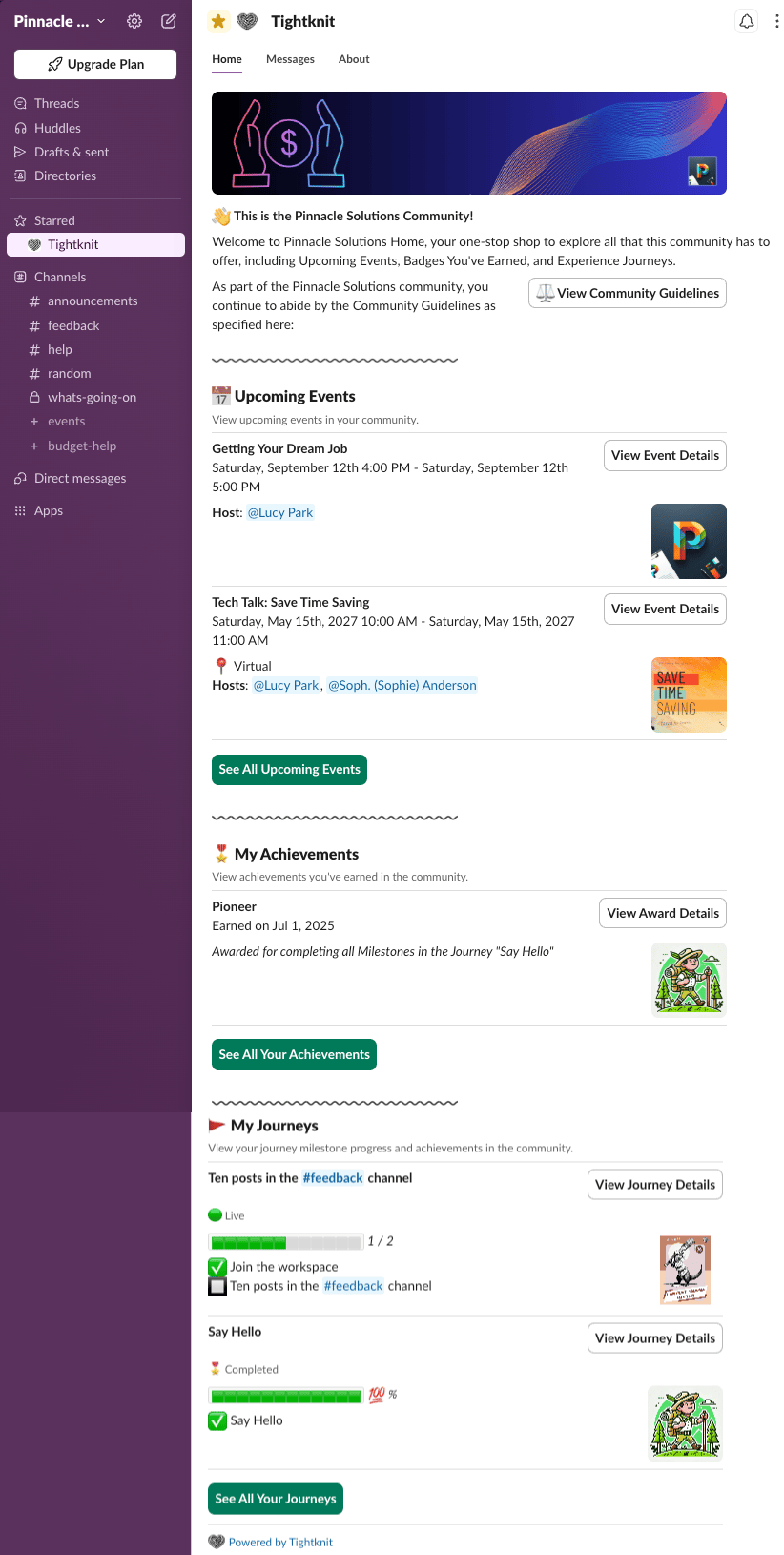
The Community Home is the experience that non-admin users see when they visit the Tightknit app in Slack. It serves as the central hub for community members to stay informed and engaged with everything happening in your community.
 ## Configuring the Community Home
Go to **[Integrations > Slack](https://studio.tightknit.ai/-/integrations/slack)** in Studio and open the **Slack Community Home** section:
* **Community Home banner** - The image displayed at the top of the Community Home.
* **Community Home intro** - A welcome message shown to members above everything else.
## What's Included
### Community Info
At the top, members see a welcome banner with your community name, a brief description, and a link to view your [Community Guidelines](/moderation/community-guidelines).
### Upcoming Events
A list of upcoming community [events](/events/getting-started), including the event title, date, time, location, and hosts. Members can click **View Event Details** to learn more about each event, or **See All Upcoming Events** to browse the full list.
### My Achievements
Members can view [achievements](/gamification/awards) they have earned in the community. Each achievement displays the name, date earned, and a description of how it was earned. Click **View Award Details** for more information, or **See All Your Achievements** to browse all earned awards.
### My Journeys
A personalized view of the member's progress through community [journeys](/gamification/journeys). Each journey shows the current milestone progress and completion status. Members can click **View Journey Details** to see the full journey breakdown, or **See All Your Journeys** to browse all available journeys.
Admins see the [admin settings](/slack/community-settings) view by default.
To preview the Community Home as a member would see it, click the **View as
Member** button in the admin home.
## Related topics
- [Slack Integration Settings](/integrations/slack.md)
- [Branding Guide](/branding.md)
- [Home Page](/community-site/home-page.md)
- [Community Guidelines](/moderation/community-guidelines.md)
- [Community Settings](/slack/community-settings.md)
## Configuring the Community Home
Go to **[Integrations > Slack](https://studio.tightknit.ai/-/integrations/slack)** in Studio and open the **Slack Community Home** section:
* **Community Home banner** - The image displayed at the top of the Community Home.
* **Community Home intro** - A welcome message shown to members above everything else.
## What's Included
### Community Info
At the top, members see a welcome banner with your community name, a brief description, and a link to view your [Community Guidelines](/moderation/community-guidelines).
### Upcoming Events
A list of upcoming community [events](/events/getting-started), including the event title, date, time, location, and hosts. Members can click **View Event Details** to learn more about each event, or **See All Upcoming Events** to browse the full list.
### My Achievements
Members can view [achievements](/gamification/awards) they have earned in the community. Each achievement displays the name, date earned, and a description of how it was earned. Click **View Award Details** for more information, or **See All Your Achievements** to browse all earned awards.
### My Journeys
A personalized view of the member's progress through community [journeys](/gamification/journeys). Each journey shows the current milestone progress and completion status. Members can click **View Journey Details** to see the full journey breakdown, or **See All Your Journeys** to browse all available journeys.
Admins see the [admin settings](/slack/community-settings) view by default.
To preview the Community Home as a member would see it, click the **View as
Member** button in the admin home.
## Related topics
- [Slack Integration Settings](/integrations/slack.md)
- [Branding Guide](/branding.md)
- [Home Page](/community-site/home-page.md)
- [Community Guidelines](/moderation/community-guidelines.md)
- [Community Settings](/slack/community-settings.md)