> ## Documentation Index
> Fetch the complete documentation index at: https://docs.tightknit.ai/llms.txt
> Use this file to discover all available pages before exploring further.
# Blocked Bot Profiles
> Learn how to block specific bots from posting to the Tightknit companion site.
By default, all bots are allowed to post to the Tightknit companion site. You can block specific bots from having visible profiles on the companion site by adding them to the `Blocked Bot Profiles` modal, found under the **Profiles** module.
Blocked Bot Profiles controls whether a bot has a visible profile on the companion site. To control whether a bot's *messages* sync to a Feed, use the [**Disallowed Bots**](/channels-and-feeds/create-feed#feed-settings) setting on the Feed.
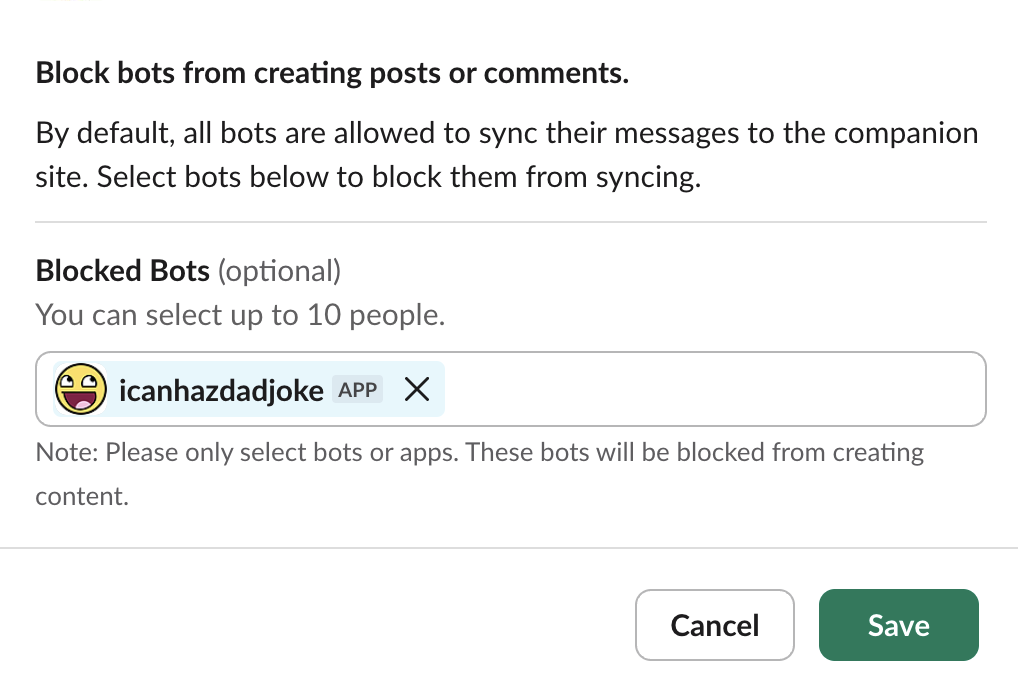 Only include bots you want to block from posting. All real members and bots not on this list are allowed to post.
Additionally, you may configure:
* **Bot Profile Photo Override** - when enabled, the user profile photos for bots are replaced on the Companion Site with your [Companion Site Icon](/companion-site/general#site-images). However, if a Slack message sent by a bot uses an explicit [icon or username override](https://api.slack.com/methods/chat.postMessage#authorship) to change the author user's appearance, this override will take precedence and will be preserved in the Companion Site.
## Limitations
* The [Slackbot](https://slack.com/help/articles/202026038-An-introduction-to-Slackbot) (i.e. user with id `USLACKBOT`) is not supported in any user dropdown inputs in the Tightknit app or user-related fields in Tightknit APIs.
* In order to sync messages sent by the Tightknit bot, the [**Post to site**](/slack/shortcuts-and-commands/message-shortcuts#tightknit-shortcuts) message shortcut must be used to manually post the message to the companion site.
Only include bots you want to block from posting. All real members and bots not on this list are allowed to post.
Additionally, you may configure:
* **Bot Profile Photo Override** - when enabled, the user profile photos for bots are replaced on the Companion Site with your [Companion Site Icon](/companion-site/general#site-images). However, if a Slack message sent by a bot uses an explicit [icon or username override](https://api.slack.com/methods/chat.postMessage#authorship) to change the author user's appearance, this override will take precedence and will be preserved in the Companion Site.
## Limitations
* The [Slackbot](https://slack.com/help/articles/202026038-An-introduction-to-Slackbot) (i.e. user with id `USLACKBOT`) is not supported in any user dropdown inputs in the Tightknit app or user-related fields in Tightknit APIs.
* In order to sync messages sent by the Tightknit bot, the [**Post to site**](/slack/shortcuts-and-commands/message-shortcuts#tightknit-shortcuts) message shortcut must be used to manually post the message to the companion site.