> ## Documentation Index
> Fetch the complete documentation index at: https://docs.tightknit.ai/llms.txt
> Use this file to discover all available pages before exploring further.
# Automated Onboarding Journeys
> Design member journeys, celebrate milestones, and recognize contributors using Tightknit's gamification features.
Use Tightknit's gamification features to design clear member journeys, celebrate meaningful milestones, and recognize contributors in ways that support your community and business goals.
## Overview
Tightknit's **Gamification** module lets you:
* Map **Journeys** that reflect how members progress in your community
* Define **Milestones** that track specific behaviors along those journeys
* Create **Awards** (badges, framed profile photos, and credentials) that recognize and celebrate completion
## 1. Access gamification in Tightknit
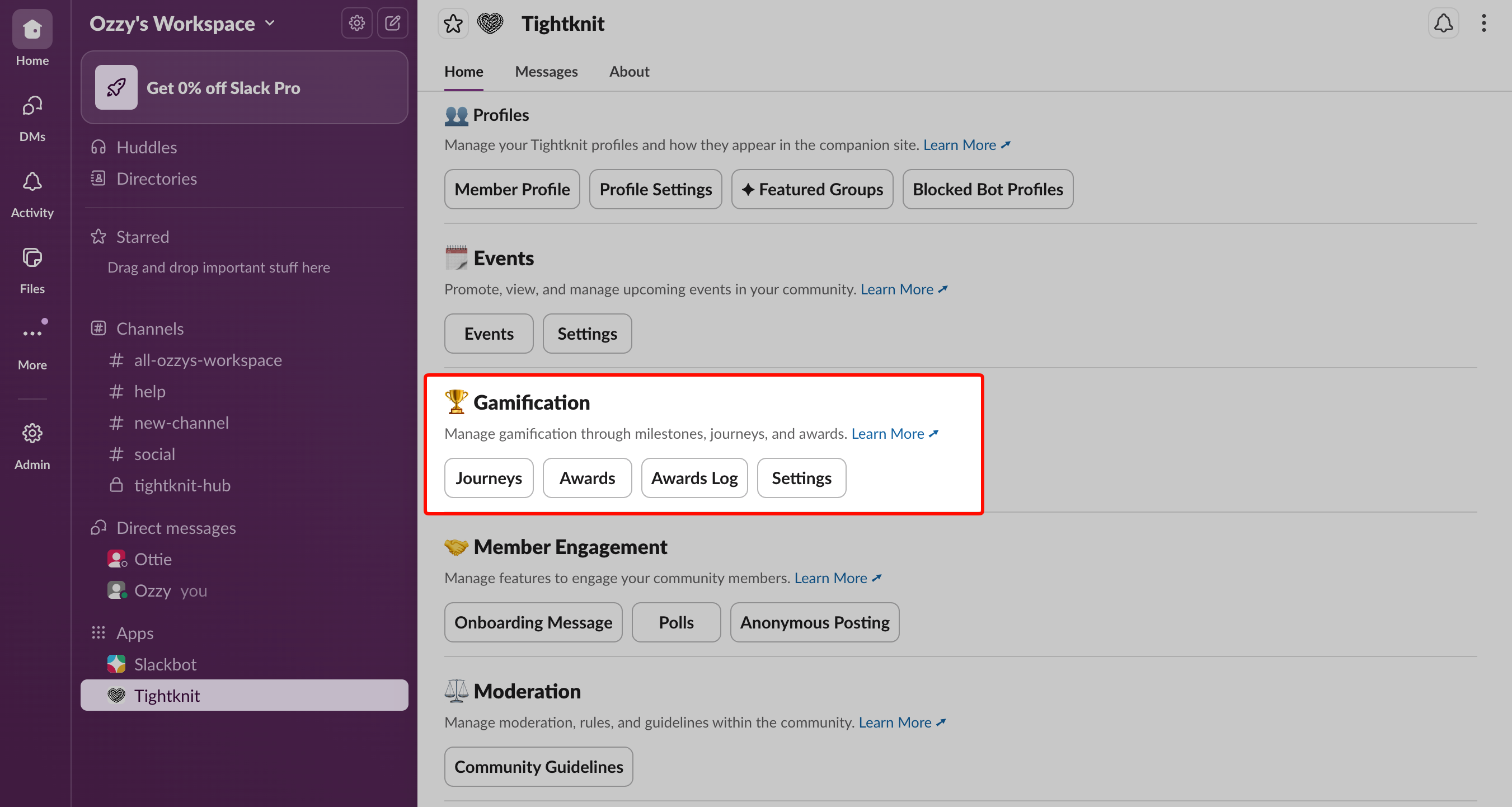
* Open the **Tightknit app** from your Slack sidebar.
* In the Tightknit Home view, navigate to the **Gamification** section.
 ## 2. Create member journeys
**Journeys** represent the paths you want members to take in your community (for example: "New member → Confident participant").
A Journey is a collection of [Milestones](/gamification/journeys#milestones). Members must complete each Milestone in the Journey, in any order, to receive the Journey's reward.
### Access the journeys list
In the Gamification module, click the **Journeys** button. This opens the **Journeys List** panel, where you can:
* Create new Journeys
* Edit existing Journeys
* Manage Milestones within each Journey
## 2. Create member journeys
**Journeys** represent the paths you want members to take in your community (for example: "New member → Confident participant").
A Journey is a collection of [Milestones](/gamification/journeys#milestones). Members must complete each Milestone in the Journey, in any order, to receive the Journey's reward.
### Access the journeys list
In the Gamification module, click the **Journeys** button. This opens the **Journeys List** panel, where you can:
* Create new Journeys
* Edit existing Journeys
* Manage Milestones within each Journey
 ### Configure a journey
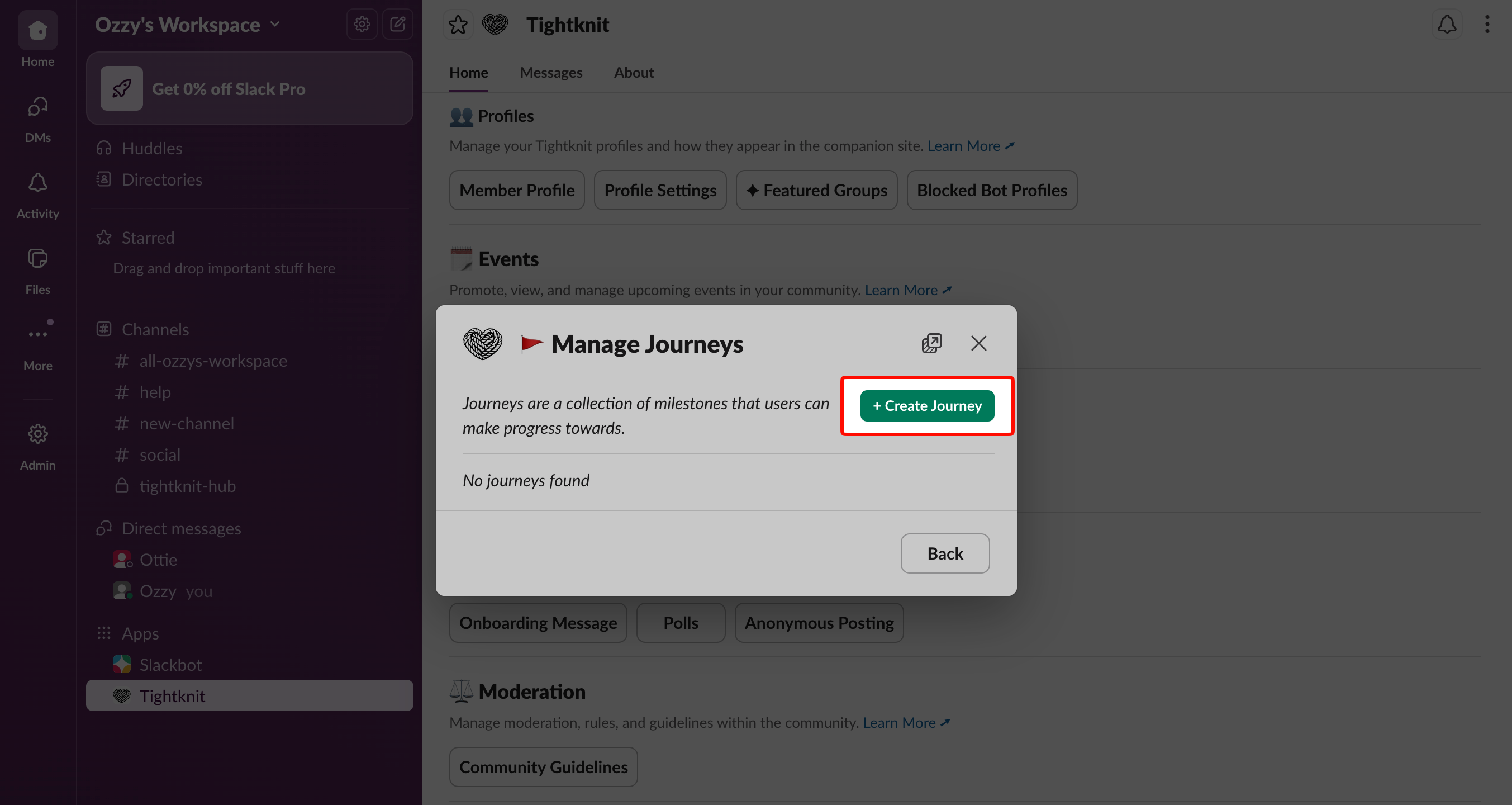
When you create or edit a Journey, you can configure:
* **Name** — The name of the Journey as members and admins will see it.
* **Completion Window** — The time period during which members' actions count toward this Journey.
* **Start Date** — When actions begin counting toward Milestones in the Journey.
* **End Date** — When actions stop counting. Once a Journey passes its End Date, it is set to **Inactive**. If you leave End Date blank, the Journey stays open indefinitely.
* **Award (optional)** — The [Award](/gamification/awards) a member receives when they complete all Milestones in this Journey.
* **Activation** — The publication status of the Journey:
* **Active**: visible and available to members.
* **Inactive**: hidden from members and not trackable.
Members can only complete Milestones for a Journey if:
* The Journey is **activated**, and
* Their actions occur **within the Journey's completion window**.
### Configure a journey
When you create or edit a Journey, you can configure:
* **Name** — The name of the Journey as members and admins will see it.
* **Completion Window** — The time period during which members' actions count toward this Journey.
* **Start Date** — When actions begin counting toward Milestones in the Journey.
* **End Date** — When actions stop counting. Once a Journey passes its End Date, it is set to **Inactive**. If you leave End Date blank, the Journey stays open indefinitely.
* **Award (optional)** — The [Award](/gamification/awards) a member receives when they complete all Milestones in this Journey.
* **Activation** — The publication status of the Journey:
* **Active**: visible and available to members.
* **Inactive**: hidden from members and not trackable.
Members can only complete Milestones for a Journey if:
* The Journey is **activated**, and
* Their actions occur **within the Journey's completion window**.
 For each Journey, decide:
* Which **steps you want to encourage automatically** with Milestones and Awards
* Which steps should trigger **manual recognition** (personal thank-you, spotlight post, DM)
* Which steps map to **business outcomes** such as activation, retention, or advocacy
## 3. Define milestones for each journey
A **Milestone** is a specific goal or behavior a member must achieve as part of a Journey. Each Milestone belongs to exactly one parent Journey.
### Manage milestones for a journey
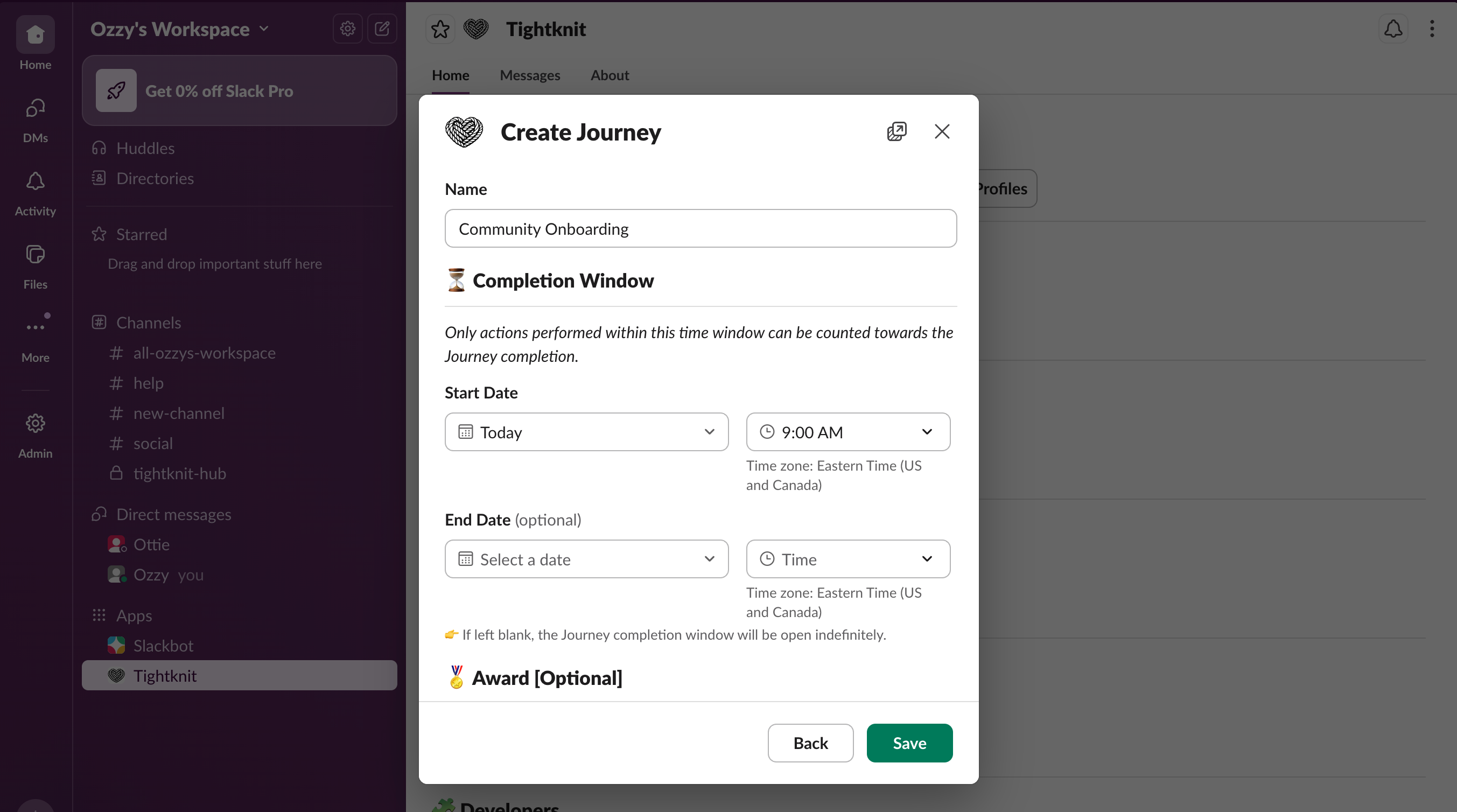
* In the **Journeys List** panel, find a Journey.
* Click the menu next to that Journey.
* Select **Manage Milestones**.
For each Journey, decide:
* Which **steps you want to encourage automatically** with Milestones and Awards
* Which steps should trigger **manual recognition** (personal thank-you, spotlight post, DM)
* Which steps map to **business outcomes** such as activation, retention, or advocacy
## 3. Define milestones for each journey
A **Milestone** is a specific goal or behavior a member must achieve as part of a Journey. Each Milestone belongs to exactly one parent Journey.
### Manage milestones for a journey
* In the **Journeys List** panel, find a Journey.
* Click the menu next to that Journey.
* Select **Manage Milestones**.
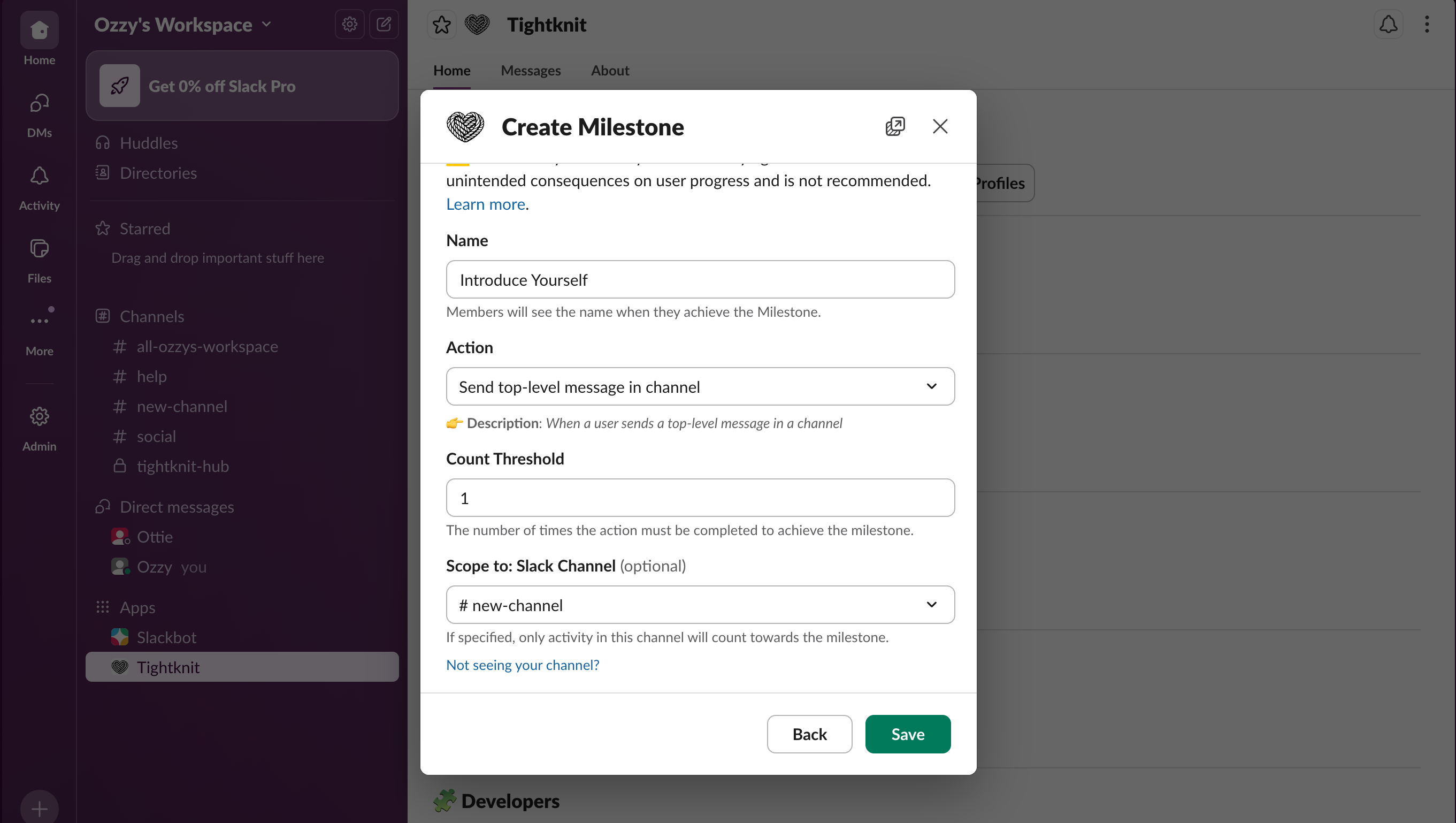
 ### Create a new milestone
From the **Manage Milestones** view:
* Click the **Create Milestone** button.
* Configure the Milestone:
* **Name** — The label for this Milestone (for example, "Introduce Yourself").
* **Action** — The [action type](/gamification/journeys#action-types) that will count toward this Milestone, such as "Post in channel" or "Reply in thread".
* **Count Threshold** — For supported action types, the number of actions required to complete the Milestone. Example: for a "Post in channel" Milestone with Count Threshold = 1, a member must post 1 time in that channel to complete the Milestone.
### Create a new milestone
From the **Manage Milestones** view:
* Click the **Create Milestone** button.
* Configure the Milestone:
* **Name** — The label for this Milestone (for example, "Introduce Yourself").
* **Action** — The [action type](/gamification/journeys#action-types) that will count toward this Milestone, such as "Post in channel" or "Reply in thread".
* **Count Threshold** — For supported action types, the number of actions required to complete the Milestone. Example: for a "Post in channel" Milestone with Count Threshold = 1, a member must post 1 time in that channel to complete the Milestone.
 Use Milestones to reflect the **behaviors you want more of**, such as:
* Posting helpful questions or updates in key channels
* Replying with thoughtful answers in support or discussion threads
* Participating in events (RSVPs, live chat, follow-up threads)
### Completing a journey
When a member completes **all Milestones** in a Journey:
* They receive a **private notification**.
* If an **Award** is configured for that Journey, it is automatically given at completion.
This keeps recognition tightly connected to the specific behaviors you care about.
## 4. Set up awards and recognition
An **Award** is the core recognition object in Tightknit gamification. It can include one or more of:
* A **badge**
* A **profile photo frame**
* A **credential / certificate**
You can connect Awards directly to Journeys, or give them manually for special contributions.
### Badge
A **Badge** is a visual marker or icon that:
* Recognizes specific achievements (for example, completing a [Journey](/gamification/journeys))
* Indicates exclusive status (for example, membership in a [Group](/community/groups))
### Profile photo frame
A **profile photo frame** lets recipients generate a framed version of their profile photo:
* Members can show off achievements clearly within the community.
* Framed photos can also be used externally (for example, on social profiles).
* Helps other members quickly identify contributors and experts
### Credential / Certificate
Awards can include credential-style elements that:
* Support **LinkedIn sharing**
* Provide a more "official" artifact of the achievement
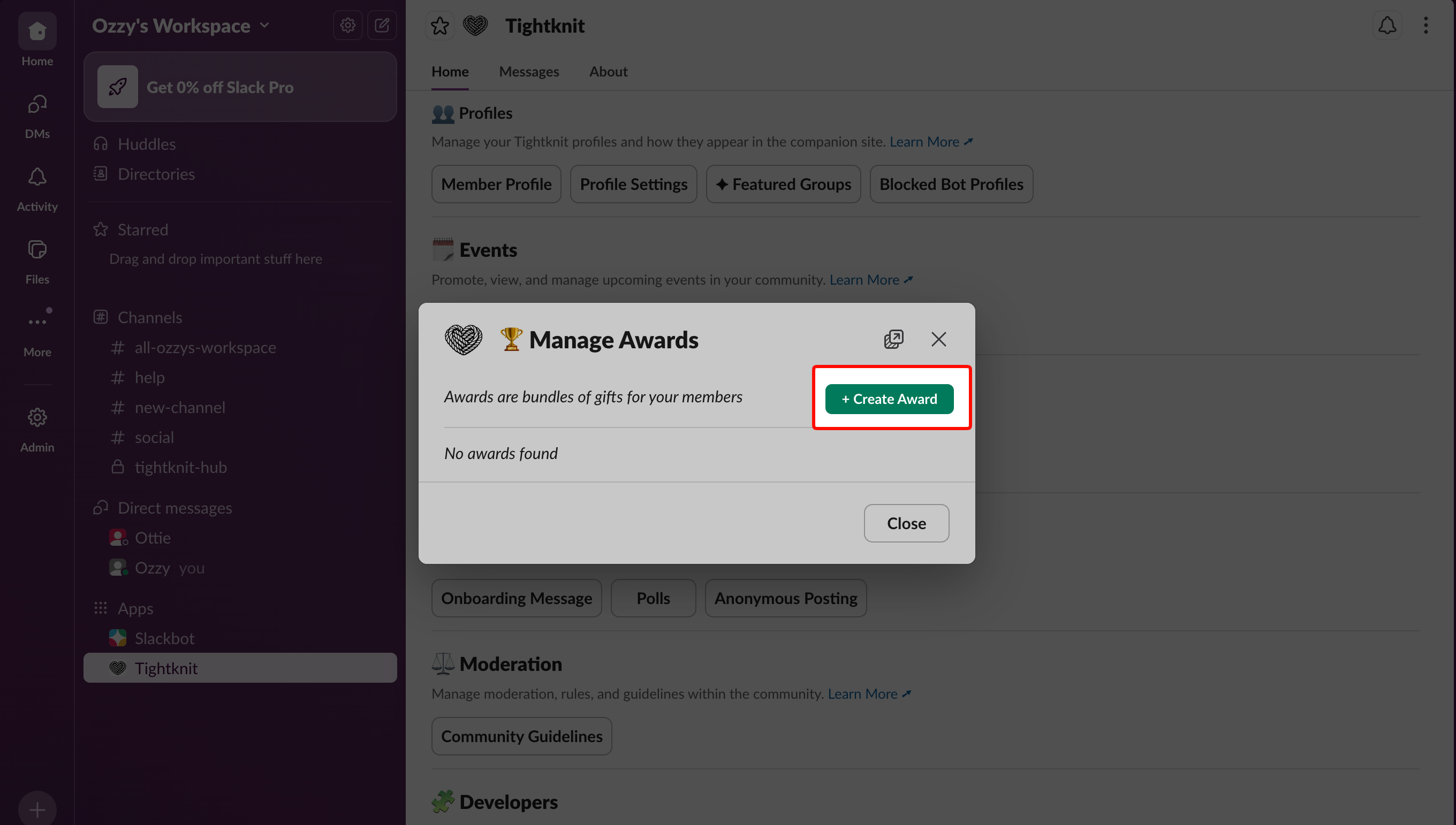
### Create an award
In the Awards section of the Gamification module, click **Create Award**.
Use Milestones to reflect the **behaviors you want more of**, such as:
* Posting helpful questions or updates in key channels
* Replying with thoughtful answers in support or discussion threads
* Participating in events (RSVPs, live chat, follow-up threads)
### Completing a journey
When a member completes **all Milestones** in a Journey:
* They receive a **private notification**.
* If an **Award** is configured for that Journey, it is automatically given at completion.
This keeps recognition tightly connected to the specific behaviors you care about.
## 4. Set up awards and recognition
An **Award** is the core recognition object in Tightknit gamification. It can include one or more of:
* A **badge**
* A **profile photo frame**
* A **credential / certificate**
You can connect Awards directly to Journeys, or give them manually for special contributions.
### Badge
A **Badge** is a visual marker or icon that:
* Recognizes specific achievements (for example, completing a [Journey](/gamification/journeys))
* Indicates exclusive status (for example, membership in a [Group](/community/groups))
### Profile photo frame
A **profile photo frame** lets recipients generate a framed version of their profile photo:
* Members can show off achievements clearly within the community.
* Framed photos can also be used externally (for example, on social profiles).
* Helps other members quickly identify contributors and experts
### Credential / Certificate
Awards can include credential-style elements that:
* Support **LinkedIn sharing**
* Provide a more "official" artifact of the achievement
### Create an award
In the Awards section of the Gamification module, click **Create Award**.
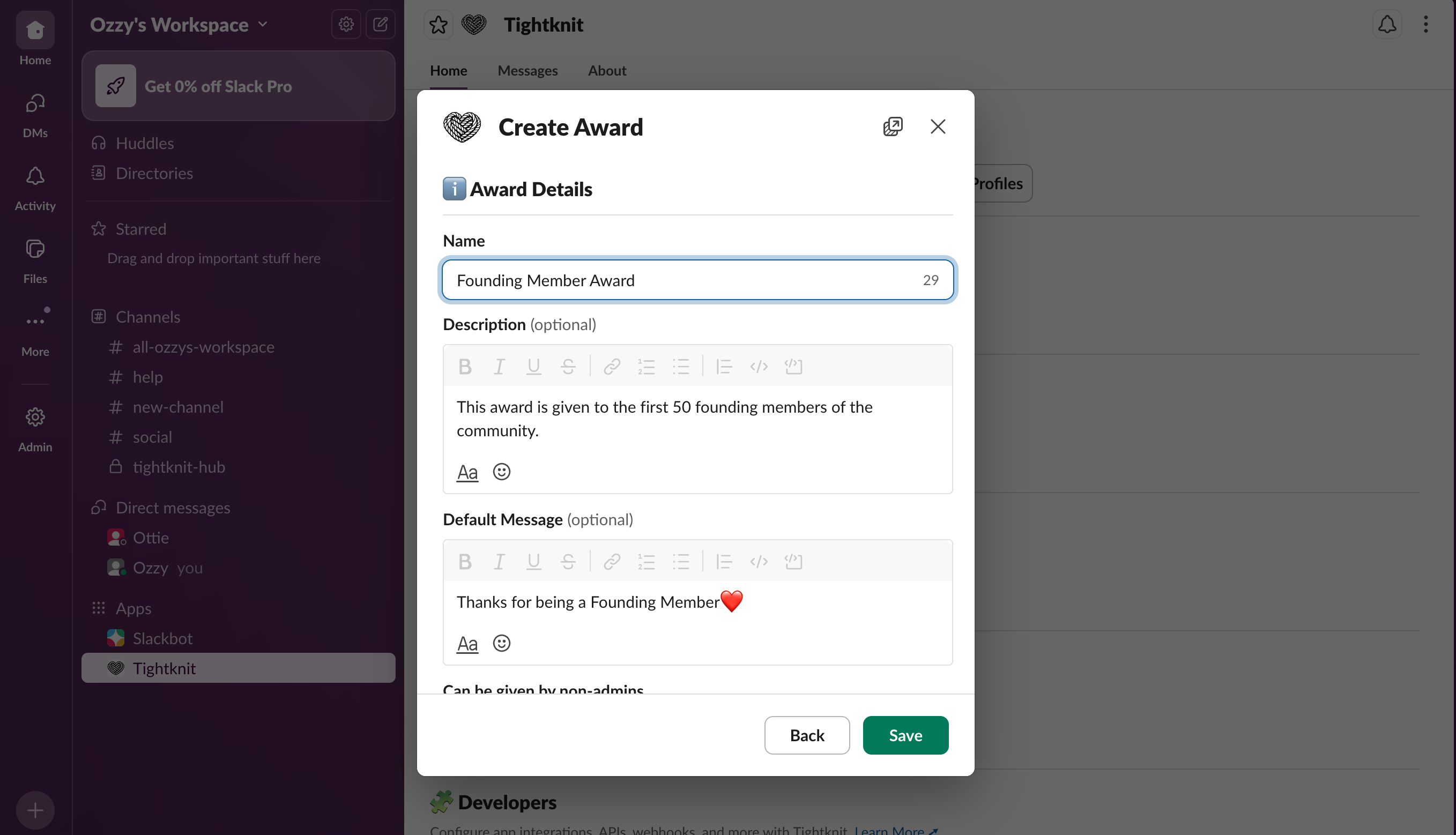
 **Configure the Award:**
* **Name**
* **Award Description** — What this Award represents and under which conditions it is given.
* **Default Award Message** — The default message sent to the member when they receive this Award. This can be overridden when giving an Award manually.
* **Can be given by non-admins** — If enabled, members with the "Give Award" permission via a [Permission Set](/community/permission-sets) and admins can give this Award. If disabled, only admins may give this Award.
* **LinkedIn Sharing** — If enabled, the notification includes an **Add to LinkedIn** button. This opens a pre-filled form to add a new [License & certification](https://www.linkedin.com/help/linkedin/answer/a567169) entry to the member's profile. The framed profile photo message also includes instructions for sharing the award in a LinkedIn post.
**Configure the Award:**
* **Name**
* **Award Description** — What this Award represents and under which conditions it is given.
* **Default Award Message** — The default message sent to the member when they receive this Award. This can be overridden when giving an Award manually.
* **Can be given by non-admins** — If enabled, members with the "Give Award" permission via a [Permission Set](/community/permission-sets) and admins can give this Award. If disabled, only admins may give this Award.
* **LinkedIn Sharing** — If enabled, the notification includes an **Add to LinkedIn** button. This opens a pre-filled form to add a new [License & certification](https://www.linkedin.com/help/linkedin/answer/a567169) entry to the member's profile. The framed profile photo message also includes instructions for sharing the award in a LinkedIn post.
 You can also:
* Upload a **badge image** or frame for the Award [(see branding guide for badge templates).](https://docs.tightknit.ai/branding)
### Receiving an award
When a member receives an Award, they get a private notification that includes:
* Who sent the Award (unless it was sent anonymously)
* The Award message
* The badge image (if configured)
* The Award description
* Action buttons (for example, add to LinkedIn, view profile, etc.)
This turns recognition into a concrete moment of celebration and sharing!
You can also:
* Upload a **badge image** or frame for the Award [(see branding guide for badge templates).](https://docs.tightknit.ai/branding)
### Receiving an award
When a member receives an Award, they get a private notification that includes:
* Who sent the Award (unless it was sent anonymously)
* The Award message
* The badge image (if configured)
* The Award description
* Action buttons (for example, add to LinkedIn, view profile, etc.)
This turns recognition into a concrete moment of celebration and sharing!
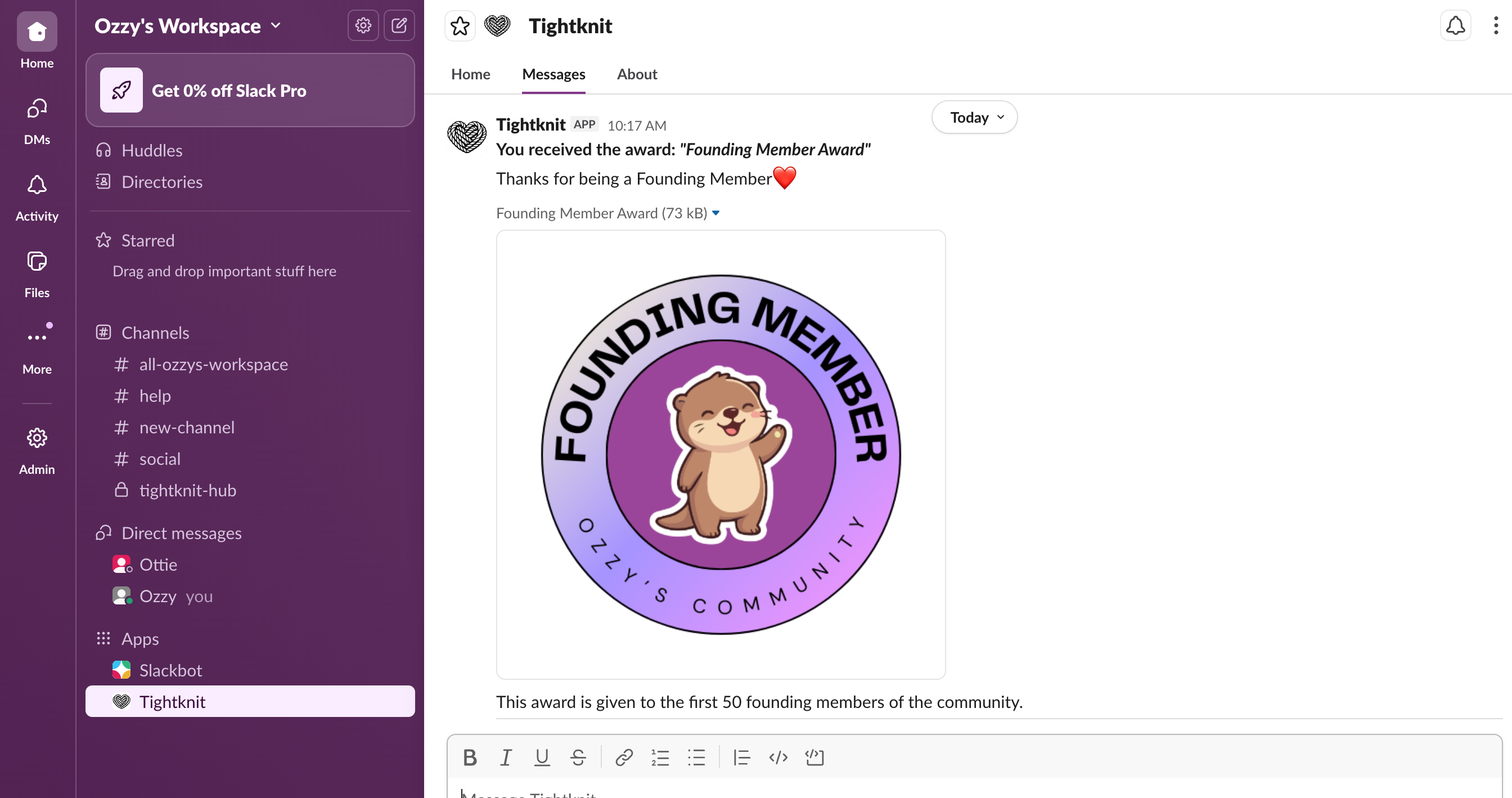 Send yourself a test award to see the user experience.
## 5. Connect gamification to real community goals
To avoid "points for points' sake," always tie Journeys, Milestones, and Awards back to real goals.
* Double-check that every **rewardable action** supports a real outcome, such as:
* **Better support quality** — More accurate answers in support or security channels.
* **Deeper product adoption** — Members sharing use cases, playbooks, or best practices.
* **Stronger cohort engagement** — Participation in premium or programmatic channels, events, or cohorts.
* Decide how you will **celebrate milestones**, beyond the automated Award:
* Shout-outs in `#celebrations` or recap posts.
* Access to special channels, cohorts, or events.
## 6. Monitor impact in Tightknit Studio
Use **Tightknit Studio** to see whether gamification is driving the right behavior.
* Open **Tightknit Studio** in your browser.
* Select a **time range** that starts before you launched gamification and extends at least 1–2 weeks after.
* Track changes in:
* **Total messages** and **replies**
* **Active members** vs. total members
* Activity in **channels tied to your Journeys and Milestones**
* Qualitatively assess whether:
* The **quality of conversation** is improving
* New contributors are participating, not just existing power users
## Troubleshooting
* Add **on-ramp rewards** for early milestones (First Post, First Answer, first event attended) to give newer members quick wins.
* Create a **"Most Improved"** or participation-based badge that highlights growth, not just top volume.
* Share a short explanation post in a main channel outlining **what is rewarded and why**.
* Keep the number of Journeys, Milestones, and Awards **small at first** so members can understand how to participate.
* Confirm that your Journeys and Milestones target **high-traffic channels** and are linked to visible Awards or shout-outs.
* Run a **time-boxed experiment** (for example, a 2-week challenge) and promote it more actively to test whether visibility, not incentives, is the bottleneck.
**Reward quality, not just quantity**
Design your gamification so the highest rewards go to behaviors that genuinely help the community: clear answers, thoughtful posts, and consistent support.
Keep the number of active Journeys, Milestones, and Awards small at first so members understand what to aim for, then expand once the basics are working.
## Related topics
- [Guides](/guides/index.md)
- [New Member Onboarding](/member-engagement/onboarding.md)
- [Journeys](/gamification/journeys.md)
- [Quickstart](/getting-started.md)
- [Slack Scopes & Permissions](/security/slack-scopes.md)
Send yourself a test award to see the user experience.
## 5. Connect gamification to real community goals
To avoid "points for points' sake," always tie Journeys, Milestones, and Awards back to real goals.
* Double-check that every **rewardable action** supports a real outcome, such as:
* **Better support quality** — More accurate answers in support or security channels.
* **Deeper product adoption** — Members sharing use cases, playbooks, or best practices.
* **Stronger cohort engagement** — Participation in premium or programmatic channels, events, or cohorts.
* Decide how you will **celebrate milestones**, beyond the automated Award:
* Shout-outs in `#celebrations` or recap posts.
* Access to special channels, cohorts, or events.
## 6. Monitor impact in Tightknit Studio
Use **Tightknit Studio** to see whether gamification is driving the right behavior.
* Open **Tightknit Studio** in your browser.
* Select a **time range** that starts before you launched gamification and extends at least 1–2 weeks after.
* Track changes in:
* **Total messages** and **replies**
* **Active members** vs. total members
* Activity in **channels tied to your Journeys and Milestones**
* Qualitatively assess whether:
* The **quality of conversation** is improving
* New contributors are participating, not just existing power users
## Troubleshooting
* Add **on-ramp rewards** for early milestones (First Post, First Answer, first event attended) to give newer members quick wins.
* Create a **"Most Improved"** or participation-based badge that highlights growth, not just top volume.
* Share a short explanation post in a main channel outlining **what is rewarded and why**.
* Keep the number of Journeys, Milestones, and Awards **small at first** so members can understand how to participate.
* Confirm that your Journeys and Milestones target **high-traffic channels** and are linked to visible Awards or shout-outs.
* Run a **time-boxed experiment** (for example, a 2-week challenge) and promote it more actively to test whether visibility, not incentives, is the bottleneck.
**Reward quality, not just quantity**
Design your gamification so the highest rewards go to behaviors that genuinely help the community: clear answers, thoughtful posts, and consistent support.
Keep the number of active Journeys, Milestones, and Awards small at first so members understand what to aim for, then expand once the basics are working.
## Related topics
- [Guides](/guides/index.md)
- [New Member Onboarding](/member-engagement/onboarding.md)
- [Journeys](/gamification/journeys.md)
- [Quickstart](/getting-started.md)
- [Slack Scopes & Permissions](/security/slack-scopes.md)