> ## Documentation Index
> Fetch the complete documentation index at: https://docs.tightknit.ai/llms.txt
> Use this file to discover all available pages before exploring further.
# Notification Email Templates
> Customize the email templates Tightknit sends to your members, block by block, with a live preview.
Custom notification templates are a **pilot** feature. [Contact us](https://tightknit.ai/contact) to request access.
By default, Tightknit sends member notification emails using a standard Tightknit template. Custom templates let you rebuild those emails to match your brand: your logo, your copy, your colors.
Open them at **[Site > Notifications > Templates](https://studio.tightknit.ai/-/website/notifications/templates)** in Studio.
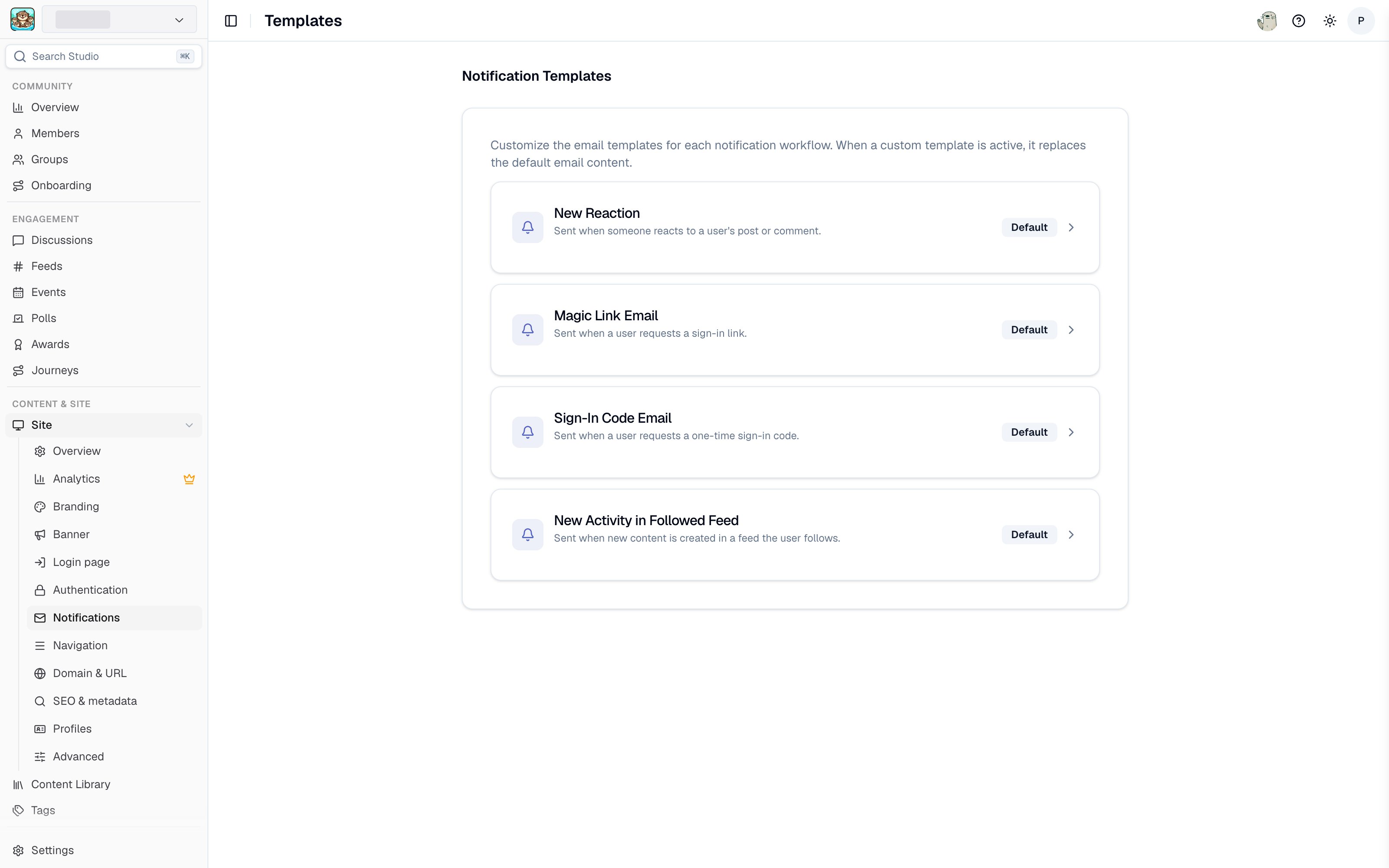 ## The templates list
Each notification workflow gets a card showing its name, what it sends, and a badge:
* **Default** - the workflow uses Tightknit's standard template.
* **Custom** - you have customized this workflow's template, and the card shows when it was last edited.
Click a workflow to open its editor.
## Editing a template
Each template has a **subject line**, a body built from blocks, and a **footer**. Add, reorder, and remove blocks to compose the body:
| Block | Purpose |
| ----------- | ------------------------------------------------------------------------------------------------ |
| **Heading** | A prominent title line. |
| **Text** | A paragraph of body copy. |
| **Image** | Your community logo, the Tightknit logo, or a custom image. Choose **Center** or **Full width**. |
| **Button** | A call to action linking members back into your community. |
| **Divider** | A horizontal rule to separate sections. |
An **Email preview** panel renders the template as you edit, so you can see the result without sending yourself a test.
For the image block, choose **Use your community logo** to keep the email in sync with your branding automatically. If no community logo is configured, the editor tells you. Set one under [Community settings](/slack/community-settings#community-images).
## Variables
Text fields support **workflow variables**, which are replaced with real values when the email is sent, for example the recipient's name or the post that triggered the notification.
Type `{` in any text field to open the autocomplete list of variables available for that workflow. Each workflow exposes a different set, because a new-post notification has different data available than a mention notification.
A variable that does not exist for a workflow renders as empty text in the sent email. Pick variables from the autocomplete list rather than typing them from memory.
## Reverting to the default
Click **Reset to Default** in the editor to discard your customizations and return the workflow to Tightknit's default template. The badge on the templates list goes back to **Default**.
## Related pages
* **[Notifications](/community-site/notifications)** - turning member notifications on or off, and email digests.
* **[Custom email domain](/community-site/notifications#custom-email-domain)** - sending from your own domain.
* **[Branding](/branding)** - the colors and logos to match.
## Related topics
- [Notifications](/community-site/notifications.md)
- [Zoom Meeting Templates](/guides/zoom-meeting-template-guide.md)
- [Award and Journey Templates](/guides/award-and-journey-templates.md)
- [Tightknit Studio](/studio/overview.md)
- [Custom Email Domain DNS Setup](/guides/custom-email-domain.md)
## The templates list
Each notification workflow gets a card showing its name, what it sends, and a badge:
* **Default** - the workflow uses Tightknit's standard template.
* **Custom** - you have customized this workflow's template, and the card shows when it was last edited.
Click a workflow to open its editor.
## Editing a template
Each template has a **subject line**, a body built from blocks, and a **footer**. Add, reorder, and remove blocks to compose the body:
| Block | Purpose |
| ----------- | ------------------------------------------------------------------------------------------------ |
| **Heading** | A prominent title line. |
| **Text** | A paragraph of body copy. |
| **Image** | Your community logo, the Tightknit logo, or a custom image. Choose **Center** or **Full width**. |
| **Button** | A call to action linking members back into your community. |
| **Divider** | A horizontal rule to separate sections. |
An **Email preview** panel renders the template as you edit, so you can see the result without sending yourself a test.
For the image block, choose **Use your community logo** to keep the email in sync with your branding automatically. If no community logo is configured, the editor tells you. Set one under [Community settings](/slack/community-settings#community-images).
## Variables
Text fields support **workflow variables**, which are replaced with real values when the email is sent, for example the recipient's name or the post that triggered the notification.
Type `{` in any text field to open the autocomplete list of variables available for that workflow. Each workflow exposes a different set, because a new-post notification has different data available than a mention notification.
A variable that does not exist for a workflow renders as empty text in the sent email. Pick variables from the autocomplete list rather than typing them from memory.
## Reverting to the default
Click **Reset to Default** in the editor to discard your customizations and return the workflow to Tightknit's default template. The badge on the templates list goes back to **Default**.
## Related pages
* **[Notifications](/community-site/notifications)** - turning member notifications on or off, and email digests.
* **[Custom email domain](/community-site/notifications#custom-email-domain)** - sending from your own domain.
* **[Branding](/branding)** - the colors and logos to match.
## Related topics
- [Notifications](/community-site/notifications.md)
- [Zoom Meeting Templates](/guides/zoom-meeting-template-guide.md)
- [Award and Journey Templates](/guides/award-and-journey-templates.md)
- [Tightknit Studio](/studio/overview.md)
- [Custom Email Domain DNS Setup](/guides/custom-email-domain.md)