> ## Documentation Index
> Fetch the complete documentation index at: https://docs.tightknit.ai/llms.txt
> Use this file to discover all available pages before exploring further.
# Home Page
> Customize your community site's Home page settings.
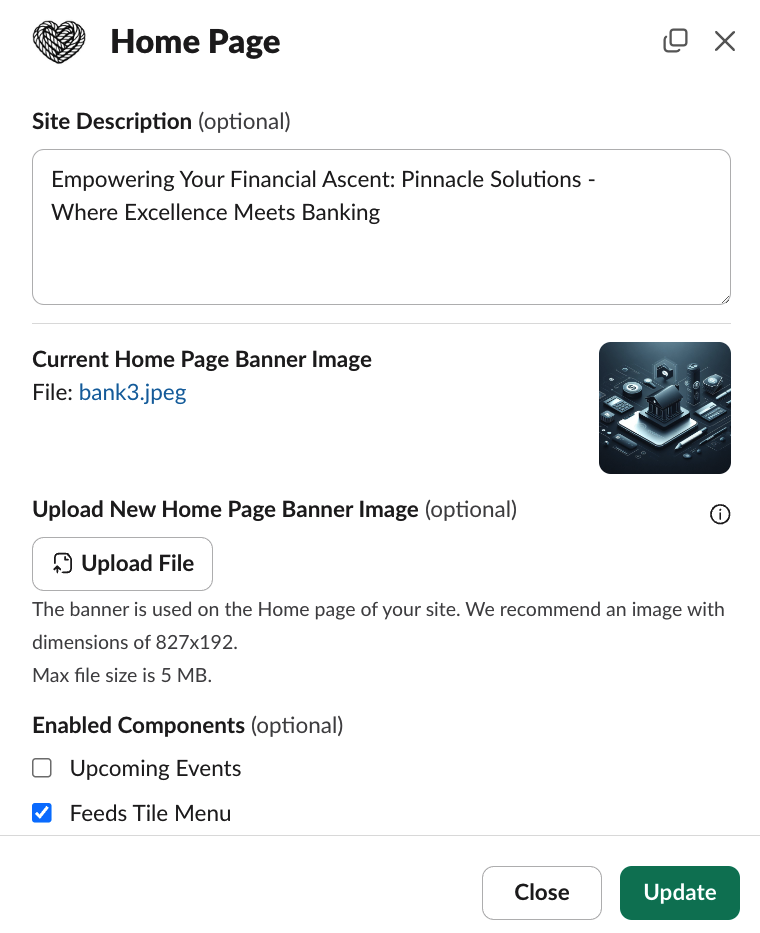
You can access the Home page settings by clicking the `Home Page` button under the **Community Site** module in your Tightknit app home.
Within the Home Page modal, you can configure the experience of the [Home page](/community-site/pages#home) of your site, including:
* **Site Description** - This is the site description listed on the Home page.
* **Banner Image** - The image banner at the top of the Home page. For the best results, please use an image with dimensions of at least 827 x 192. Very tall images may be clipped.
* **Enabled Components** - Enable or disable the components displayed on the Home page, including:
* Feeds Tile Menu - displays tiles for each of your community's feeds
* Upcoming Events List - displays a list of upcoming community events
* Member Count - displays the total number of community members on the Home page only.
* Discussions Count - displays the total number of unique discussion threads synced to the site
 ## Related topics
- [Pages](/community-site/pages.md)
- [Branding Guide](/branding.md)
- [Thread Engagement Reminder](/member-engagement/thread-responder.md)
- [Gamification Settings](/gamification/settings.md)
- [Community Guidelines](/moderation/community-guidelines.md)
## Related topics
- [Pages](/community-site/pages.md)
- [Branding Guide](/branding.md)
- [Thread Engagement Reminder](/member-engagement/thread-responder.md)
- [Gamification Settings](/gamification/settings.md)
- [Community Guidelines](/moderation/community-guidelines.md)